Client-Server Interaction
This section presents a step-by-step walkthrough of an MCP client-server interaction, demonstrating the lifecycle, tool operations, and notifications with JSON-RPC 2.0 messages.
Initialize
The initialization phase establishes the client-server connection and negotiates supported protocol features. This is the first step in any MCP client-server interaction.
The following example shows how to initialize a product search MCP server in Cursor. The client sends an initialize request to establish the connection and negotiate supported features, protocol version, and capabilities.
- Request
- Response
    {
      "method": "POST",
      "url": "/invoke/94c316b3-8aae-4ab5-b19b-8fc1d6b2cb64/mcp",
      "headers": {
        "host": "asia-south1.mcp.boltic.app",
        ...
      },
      "params": {
        "server_id": "94c316b3-8aae-4ab5-b19b-8fc1d6b2cb64"
      },
      "body": {
        "method": "initialize",
        "params": {
          "protocolVersion": "2025-06-18",
          "capabilities": {
            "tools": {}
          },
          "clientInfo": {
            "name": "gideon-metadata-client",
            "version": "1.0.0"
          }
        },
        "jsonrpc": "2.0",
        "id": 0
      },
    }
{
  "status_code": 200,
  "data": {
    "result": {
      "protocolVersion": "2025-06-18",
      "capabilities": {
        "tools": {}
      },
      "serverInfo": {
        "name": "TiraBeauty V2",
        "version": "1.0.0"
      }
    },
    "jsonrpc": "2.0",
    "id": 0
  },
  "headers": {
    ...
  },
}
Key Components of the Initialize Request:
method: "initialize": The JSON-RPC method name indicating this is an initialization requestprotocolVersion: "2025-06-18": The MCP protocol version the client supports. Both client and server must support compatible versionscapabilities: An object describing what features the client supports (e.g., tools, resources, prompts, sampling)clientInfo: Metadata about the client, including:name: The client application name (e.g., "gideon-metadata-client")version: The client version (e.g., "1.0.0")
jsonrpc: "2.0": The JSON-RPC protocol version being used
Initialize Response:
The server responds with:
protocolVersion: The protocol version the server will use (must be compatible with the client's version)capabilities: What features the server supports and exposesserverInfo: Metadata about the server, including:name: The server name (e.g., "TiraBeauty V2")version: The server version (e.g., "1.0.0")
Initialized Notification
After successful initialization, the client sends an initialized notification to indicate it is ready to receive requests and notifications from the server. This JSON-RPC notification does not include an id field, so the server does not return a response.
- Request
- Response
"body": {
  "method": "notifications/initialized",
  "jsonrpc": "2.0"
}
{
   "status_code": 202,
   "data": null,
   "headers": {},
   "timestamp": "2025-12-09T12:40:23.956Z",
   "content_type": "application/json",
   "body_length": 0,
   "captured": false
 }
Tool Discovery
Once the connection is established, the client can discover available tools by sending a tools/list request. This request is fundamental to MCP’s tool discovery mechanism — it allows clients to understand which tools are available on the server before attempting to use them.
- Request
- Response
  {
    "method": "POST",
    "url": "/invoke/94c316b3-8aae-4ab5-b19b-8fc1d6b2cb64/mcp",
    "headers": {
      "host": "asia-south1.mcp.boltic.app",
      ...
    },
    "params": {
      "server_id": "94c316b3-8aae-4ab5-b19b-8fc1d6b2cb64"
    },
    "query": {},
    "body": {
      "method": "tools/list",
      "jsonrpc": "2.0",
      "id": 1
    },
    "timestamp": "2025-12-11T07:17:19.120Z",
    "protocol_version": "2025-06-18"
  }`
  {
    "status_code": 200,
    "data": {
      "result": {
        "tools": [
          {
            "name": "t1_mcp_tira_seach_products",
            "description": "This workflow enables users to perform a product search on the Tira platform by providing a search query. It supports pagination through the 'pageNo' and 'pageSize' parameters, and allows sorting of results using the 'sortOn' field (e.g., by relevance).",
            "annotations": {
              "title": "t1_mcp_tira_seach_products - workflow"
            },
            "inputSchema": {
              "type": "object",
              "properties": {
                "q": {
                  "type": "string",
                  "description": "The query to search for"
                },
                "pageno": {
                  "type": "string",
                  "description": "The page number to search"
                },
                "sorton": {
                  "type": "string",
                  "description": "The filter to use while searching for the product, ex: relevance, latest, price_asc, price_desc. Always default to relevance if no option provided"
                },
                "pagesize": {
                  "type": "string",
                  "description": "The number of items to bring per page"
                }
              },
              "required": [
                "q",
                "pageno",
                "sorton",
                "pagesize"
              ]
            }
          },
          {
            "name": "t2_mcp_tira_product_variants",
            "description": "This workflow retrieves all available variants for a specific Tira product using its slug. It returns details like variant name, UID, price, and other attributes to help users view and select among product options",
            "annotations": {
              "title": "t2_mcp_tira_product_variants - workflow"
            },
            "inputSchema": {
              "type": "object",
              "properties": {
                "slug": {
                  "type": "string",
                  "description": "The slug of the product"
                }
              },
              "required": [
                "slug"
              ]
            }
          },
          {
            ...
          }
        ]
      },
      "jsonrpc": "2.0",
      "id": 1
    },
    "headers": {
      ...
    },
    "timestamp": "2025-12-11T07:17:19.162Z",
    "content_type": "application/json",
    "body_length": 6992,
    "captured": true
  }
The response includes a tools array with comprehensive metadata for each available tool. This structure allows servers to expose multiple tools at once while maintaining clear boundaries between functionalities.
Tool Metadata Structure:
Each tool in the response includes the following key fields:
-
name: A unique identifier for the tool within the server's namespace. This serves as the primary key for tool execution and should follow a clear, consistent naming pattern. In the example response, the tool name ist1_mcp_tira_seach_products. Tool names are case-sensitive and must match exactly when calling the tool. -
title(in annotations): A human-readable display name for the tool that clients can show to users. This provides a friendly name that's easier to understand than the technical tool name. -
description: A detailed explanation of the tool’s function and appropriate use-cases. This description helps AI models understand the tool's purpose and decide when to invoke it. In the example, the description states: "This workflow enables users to perform a product search on the Tira platform by providing a search query. It supports pagination through the 'pageNo' and 'pageSize' parameters, and allows sorting of results using the 'sortOn' field (e.g., by relevance)." -
inputSchema: A JSON Schema that defines expected input parameters, enabling type validation and providing clear documentation for required and optional parameters. The schema includes:- Parameter names and types (string, number, boolean, object, array)
- Parameter descriptions
- Required vs. optional parameters
- Default values (if applicable)
- Validation constraints (e.g., min/max values, patterns)
This structured metadata enables AI models to understand available tools, their purposes, and correct usage.
Tool Call
After discovering available tools, the client can execute them using the tools/call method. This demonstrates how MCP primitives are used in practice, as the client or AI model invokes tools with the appropriate arguments to perform operations.
Example Use Case
The following example demonstrates a real-world scenario in which a user provides the instruction "Give me a list of top-10 highly rated maroon color lipstick" in Cursor. The AI model interprets the request, identifies the appropriate tool (t1_mcp_seach_products), and invokes it with the correct parameters.
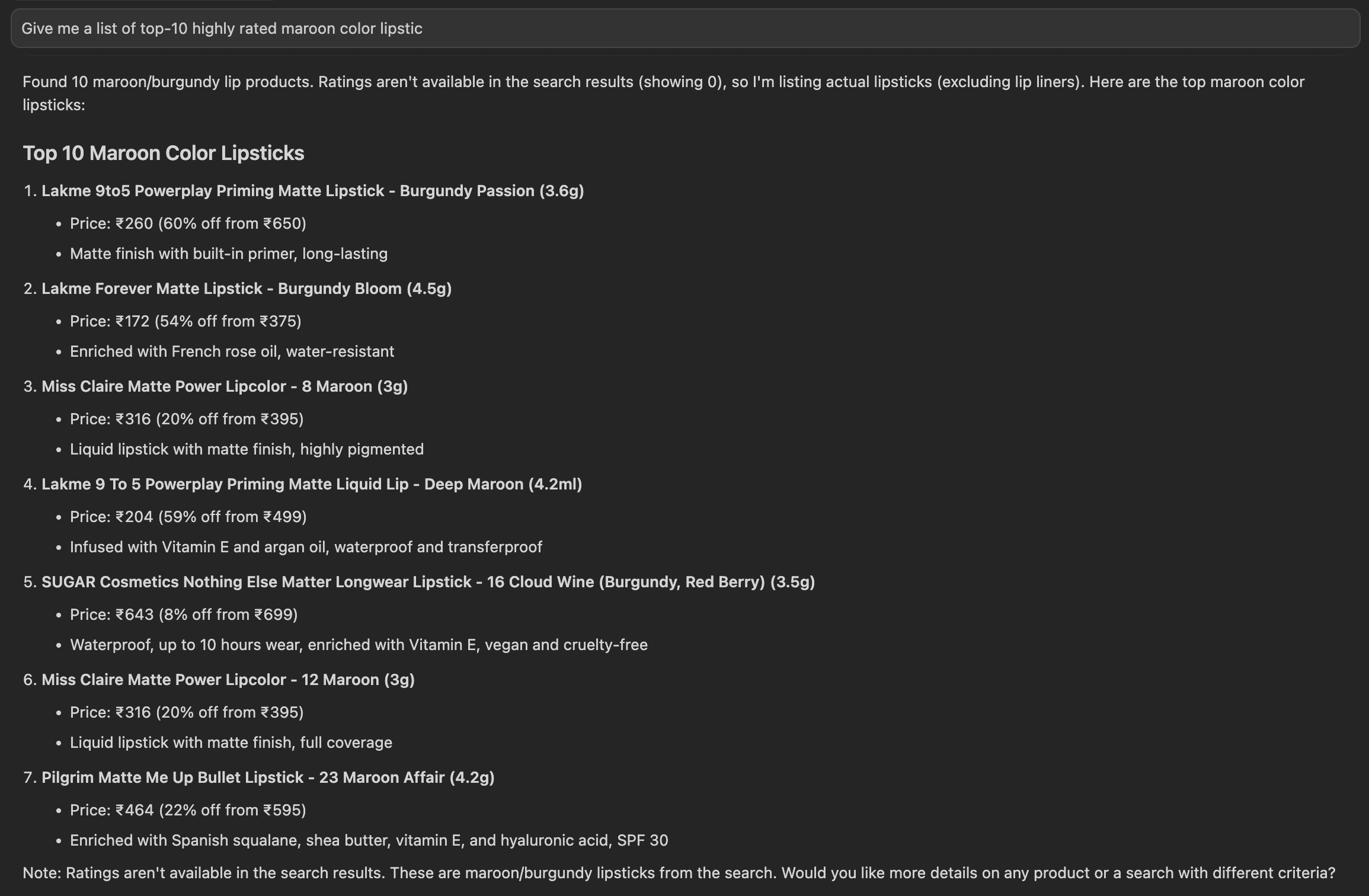
Request Structure
The tool call request uses the exact tool name from the discovery response (t1_mcp_tira_seach_products) rather than a simplified name. The request structure includes several important components:
method: "tools/call": The JSON-RPC method indicating this is a tool execution requestname: Must match exactly the tool name from the discovery response (t1_mcp_tira_seach_products). This ensures the server can correctly identify which tool to execute. Tool names are case-sensitive.arguments: Contains the input parameters as defined by the tool'sinputSchema. In this example:q: "maroon lipstick" (the search query)pageno: "1" (the page number for pagination)sorton: "relevance" (sorting criteria)pagesize: "10" (number of results per page)
_meta: Optional metadata, including aprogressTokenfor tracking long-running operations
- Request
- Response
{
"method": "POST",
"url": "/invoke/94c316b3-8aae-4ab5-b19b-8fc1d6b2cb64/mcp",
"headers": {
  "host": "asia-south1.mcp.boltic.app",
  "x-request-id": "1982...[REDACTED]...7c5a",
  "x-real-ip": "[REDACTED]",
  "x-forwarded-for": "[REDACTED]",
  "x-forwarded-host": "asia-south1.mcp.boltic.app",
  "x-forwarded-port": "80",
  "x-forwarded-proto": "https",
  "x-forwarded-scheme": "https",
  "x-scheme": "https",
  "x-original-forwarded-for": "[REDACTED]",
  "content-length": "207",
  "cf-ray": "9ac3332dabc44433-BOM",
  "accept-language": "*",
  "cdn-loop": "cloudflare; loops=1",
  "accept-encoding": "gzip, br",
  "accept": "application/json, text/event-stream",
  "content-type": "application/json",
  "cf-ipcountry": "[REDACTED]",
  "cf-visitor": "{\"scheme\":\"https\"}",
  "cf-connecting-ip": "[REDACTED]",
  "user-agent": "Cursor/2.0.75 (darwin arm64)",
  "sec-fetch-mode": "cors",
  "mcp-protocol-version": "2025-06-18",
  "x-cloud-trace-context": "83eb...[REDACTED]...77c9/10212825880080022890",
  "via": "1.1 google",
  "x-fynd-trace-id": "[REDACTED]",
  "x-fynd-response-id": "[REDACTED]"
},
"params": {
  "server_id": "94c316b3-8aae-4ab5-b19b-8fc1d6b2cb64"
},
"query": {},
"body": {
  "method": "tools/call",
  "params": {
    "name": "t1_mcp_tira_seach_products",
    "arguments": {
      "q": "maroon lipstick",
      "pageno": "1",
      "sorton": "relevance",
      "pagesize": "10"
    },
    "_meta": {
      "progressToken": "[REDACTED]"
    }
  },
  "jsonrpc": "2.0",
  "id": 2
},
"ip": "[REDACTED]",
"user_agent": "Cursor/2.0.75 (darwin arm64)",
"timestamp": "2025-12-11T07:17:01.766Z",
"protocol_version": "2025-06-18"
}
{
"status_code": 200,
"data": {
  "result": {
    "content": [
      {
        "type": "text",
        "text": "[\n  {\n    \"name\": \"Lakme 9to5 Powerplay Priming Matte Lipstick Lasts 16hrs - Burgundy Passion (3.6 g)\",\n    \"slug\": \"lakme-9-to-5-primer--matte-lip-color---burgundy-passion-36g-1pgwyvcrodx\",\n    \"url\": \"https://www.tirabeauty.com/product/lakme-9-to-5-primer--matte-lip-color---burgundy-passion-36g-1pgwyvcrodx\",\n    \"discount\": \"60% OFF\",\n    \"rating\": 0,\n    \"item_id\": *******,\n    \"item_code\": \"1080059\",\n    \"price\": {\n      \"effective\": {\n        \"min\": 260,\n        \"max\": 260,\n        \"currency_code\": \"INR\",\n        \"currency_symbol\": \"₹\"\n      },\n      \"marked\": {\n        \"min\": 650,\n        \"max\": 650,\n        \"currency_code\": \"INR\",\n        \"currency_symbol\": \"₹\"\n      }\n    },\n    \"description\": \"Boost the charm of your lips with the Lakme 9 To 5 Primer + Matte Lip Color - Burgundy Passion (3.6g). This matte lipstick with rich and intense color will give you a perfect look for any occasion. With its high pigmentation and long-lasting finish, this Lakme lip color will make your lips look beautiful. It's a bullet lipstick with a built-in primer to ensure smooth application and long-lasting wear.Key Features & Benefits:Matte finish lip color for a soft and smooth applicationHighly pigmented lipstick for rich and intense color payoffHas built-in primer to help keep your lips moisturizedLong-lasting lipstick stays intact for prolonged hoursAll Ingredients:Phenyl Trimethicone, Polyethylene, DimethiconeHow to Use:Twist up the bullet and start by defining the edges and corners of your lips. Then, fill in the rest of your lips with light, sweeping strokes to create a pretty pout. For best results, exfoliate your lips and moisturize them before applying your lipstick.About the Brand:Founded in 1952, Lakme is an Indian cosmetics brand that has been serving its consumers with premium-quality makeup and skincare products for a long time. This brand has a wide range of beauty products starting from BB cream, foundation, mascara, and eyeliner to sunscreen, moisturizer, night cream, nail polish, and more. Moreover, their products are available on a consumer-friendly budget so that you can still experience the goodness of makeup and beauty products without going over your budget.Browse through the extensive range of Lipstick on Tira. Shop all Lakme products here.Alternatively, you can also explore our wide range of Makeup products here on Tira.\",\n    \"medias\":
        [\n      {\n   \"type\": \"image\",\n        \"url\": \"https://cdn.tirabeauty.com/v2/billowing-snowflake-434234/tira-p/wrkr/products/pictures/item/free/original/lakme/1080059/10/riwLdlwg83-AC_Lakme.jpg\",\n        \"alt\": \"Lakme 9to5 Powerplay Priming Matte Lipstick Lasts 16hrs - Burgundy Passion (3.6 g)\"\n      }\n    ]\n  },\n
        {\n    \"name\": \"Swiss Beauty Bold Matt Lip Liner - Maroon (1.6 g)\",\n    \"slug\": \"swiss-beauty-bold-matt-lip-liner-maroon-1-6-g-7591832\",\n    \"url\": \"https://www.tirabeauty.com/product/swiss-beauty-bold-matt-lip-liner-maroon-1-6-g-7591832\",\n    \"discount\": \"16% OFF\",\n    \"rating\": 0,\n    \"item_id\": 7591832,\n    \"item_code\": \"1135191\",\n    \"price\": {\n      \"effective\": {\n        \"min\": 58,\n        \"max\": 58,\n        \"currency_code\": \"INR\",\n        \"currency_symbol\": \"₹\"\n      },\n      \"marked\": {\n        \"min\": 69,\n        \"max\": 69,\n        \"currency_code\": \"INR\",\n        \"currency_symbol\": \"₹\"\n      }\n    },\n    \"description\": \"Draw a flawless pout with the Swiss Beauty Bold Matt Lip Liner - Maroon (1.6 g). This moisturizing lip liner, infused with glycerin and castor oil, hydrates the lips and glides effortlessly, delivering a rich matte color to define the lips. Plus, this Swiss Beauty matte lip liner is a waterproof lip liner that ensures long-lasting wear without drying out the lips.Key Features & Benefits:Infused with glycerin and castor oil to keep the lips moisturizedHighly pigmented liner contours the lips with a matte colorLines and coats the lips with weightless, non-drying color for all-day comfortable wearCruelty-free, dermatologically-tested, and vegan formula does not contain paraben or alcohol to ensure safe use Key Ingredients:Glycerin and castor oil: Moisturize the lipsHow to Use:Outline your lips following the natural contours of your mouth. For a more defined look, you can overline your lips by drawing steady lines a little outside your natural lip line. Once done, you can fill in the rest of the lips using lipstick, lip gloss, or lip crayon for a perfect pout.About the Brand:Founded in 2008, Swiss Beauty is a cosmetics brand that caters to all your skin care needs. They offer a wide range of cosmetic products for lips, eyes, nails, and overall skin. The brand is on a mission to elevate your beauty concepts to match Swiss standards. Swiss Beauty products maintain a high standard of manufacturing with ingredients specially imported from Japan, Italy, Germany, and Taiwan to ensure safe use on the skin.Browse through the extensive range of Lip Liner on Tira. Shop all Swiss Beauty products.Alternatively, you can also explore a wide range of Makeup products here on Tira.\",\n    \"medias\": [\n      {\n        \"type\": \"image\",\n        \"url\": \"https://cdn.tirabeauty.com/v2/billowing-snowflake-434234/tira-p/wrkr/products/pictures/item/free/original/1135191/9FhOm62xt7-1135191_1.jpg\",\n        \"alt\": \"Swiss Beauty Bold Matt Lip Liner - Maroon (1.6 g)\"\n      },\n      {\n        \"type\": \"image\",\n        \"url\": \"https://cdn.tirabeauty.com/v2/billowing-snowflake-434234/tira-p/wrkr/products/pictures/item/free/original/1135191/-ycHqrKOFg-1135191_2.jpg\",\n        \"alt\": \"Swiss Beauty Bold Matt Lip Liner - Maroon (1.6 g)\"\n      },\n      {\n        \"type\": \"image\",\n        \"url\": \"https://cdn.tirabeauty.com/v2/billowing-snowflake-434234/tira-p/wrkr/products/pictures/item/free/original/1135191/4S8_BKZdEK-1135191_3.jpg\",\n        \"alt\": \"Swiss Beauty Bold Matt Lip Liner - Maroon (1.6 g)\"\n      },\n      {\n        \"type\": \"image\",\n        \"url\": \"https://cdn.tirabeauty.com/v2/billowing-snowflake-434234/tira-p/wrkr/products/pictures/item/free/original/1135191/o5mV61AIz0-1135191_4.jpg\",\n        \"alt\": \"Swiss Beauty Bold Matt Lip Liner - Maroon (1.6 g)\"\n      },\n      {\n        \"type\": \"image\",\n        \"url\": \"https://cdn.tirabeauty.com/v2/billowing-snowflake-434234/tira-p/wrkr/products/pictures/item/free/original/1135191/VtKyvRi37S-1135191_5.jpg\",\n        \"alt\": \"Swiss Beauty Bold Matt Lip Liner - Maroon (1.6 g)\"\n      },\n      {\n        \"type\": \"image\",\n        \"url\": \"https://cdn.tirabeauty.com/v2/billowing-snowflake-434234/tira-p/wrkr/products/pictures/item/free/original/swiss-beauty/1135191/5/NbmI5HNdTy-AC_Swiss-Beauty.jpg\",\n        \"alt\": \"Swiss Beauty Bold Matt Lip Liner - Maroon (1.6 g)\"\n      }\n    ]\n  },\n  {\n    \"name\": \"Miss Claire Glimmersticks Lipliner - L-13 Maroon (1.8g)\",\n    \"slug\": \"miss-claire-glimmersticks-lipliner---l-13-maroon-18g-unoi1h8g7hc6\",\n    \"url\": \"https://www.tirabeauty.com/product/miss-claire-glimmersticks-lipliner---l-13-maroon-18g-unoi1h8g7hc6\",\n    \"discount\": \"11% OFF\",\n    \"rating\": 0,\n    \"item_id\": 7503531,\n    \"item_code\": \"948505\",\n    \"price\": {\n      \"effective\": {\n        \"min\": 58,\n        \"max\": 58,\n        \"currency_code\": \"INR\",\n        \"currency_symbol\": \"₹\"\n      },\n      \"marked\": {\n        \"min\": 65,\n        \"max\": 65,\n        \"currency_code\": \"INR\",\n        \"currency_symbol\": \"₹\"\n      }\n    },\n    \"description\": \"Add a pop of colour to any make-up look with the Miss Claire Glimmersticks Lipliner - L-13 Maroon (1.8g.) It glides on smoothly without tugging at the lips or smudging unevenly. You can use this highly pigmented lip liner to create a well-defined look or blend it with your lipstick for a subtle yet pretty pout. This waterproof liner formula has superior staying power and can also be used to fill in your lips with satiny-smooth colour.Key Features & Benefits:Shimmery lip liner adds a beautiful sparkle to your lipsSatiny-smooth liner glides on easily without tugging at your lipsWaterproof formula with long-staying powerRich pigment creates a defined look and can be easily blended with lipstick or lip glossSuitable for outlining your lips and filling them in with rich colourHow to Use:Using the sharpened tip of the lip liner, follow the outer lines of your lips for a beautiful contour. You can then fill in your lips with lipstick or continue using the lip liner to add colour to your pout. You can increase the pigment's intensity on your lips by adjusting the pressure of each stroke.All Ingredients:Beeswax Microcrystalline Wax Candelilla Wax, Carnauba Wax. Castor Oil, 2-Ethylhexyl Palmitate, Isopropyl Myristate, Butylated Hydroxy Toluene Propylparaben, May Contain:Ci 77491, Ci 77492, Ci 77288. Ci 77289. Ci 77510, Ci 77007, Ci 77742, Ci 77891.About the Brand:Founded in 2011, Miss Claire has established itself as one of the fastest-growing cosmetics brands in India. Miss Claire creates its products with the finest ingredients that comply with European standards to offer the best care for your skin. This beauty brand presents an entire range of cosmetics and colourful make-up options for your face, lips, and eyes. Loved by make-up fans in India and across the globe, Miss Claire is a brand focused on premier quality, on-trend products, affordable prices, and skin-tone inclusivity.Browse through the extensive range of Lip Liner on Tira. Shop all Miss Claire products here.Alternatively, you can also explore our wide range of Makeup products here on Tira.\",\n    \"medias\": [\n      {\n        \"url\": \"https://cdn.tirabeauty.com/v2/billowing-snowflake-434234/tira-p/wrkr/products/pictures/item/free/original/948505/yGBpSfMRN-948505_1.jpg\",\n        \"type\": \"image\",\n        \"alt\": \"Miss Claire Glimmersticks Lipliner - L-13 Maroon (1.8g)\"\n      },\n      {\n        \"url\": \"https://cdn.tirabeauty.com/v2/billowing-snowflake-434234/tira-p/wrkr/products/pictures/item/free/original/948505/UhXczqle-U-948505_2.jpg\",\n        \"type\": \"image\",\n        \"alt\": \"Miss Claire Glimmersticks Lipliner - L-13 Maroon (1.8g)\"\n      },\n      {\n        \"url\": \"https://cdn.tirabeauty.com/v2/billowing-snowflake-434234/tira-p/wrkr/products/pictures/item/free/original/948505/X-Ti_ah24H-948505_3.jpg\",\n        \"type\": \"image\",\n        \"alt\": \"Miss Claire Glimmersticks Lipliner - L-13 Maroon (1.8g)\"\n      },\n      {\n        \"url\": \"https://cdn.tirabeauty.com/v2/billowing-snowflake-434234/tira-p/wrkr/products/pictures/item/free/original/948505/Cxbwe7yQvk-948505_4.jpg\",\n        \"type\": \"image\",\n        \"alt\": \"Miss Claire Glimmersticks Lipliner - L-13 Maroon (1.8g)\"\n      },\n      {\n        \"url\": \"https://cdn.tirabeauty.com/v2/billowing-snowflake-434234/tira-p/wrkr/products/pictures/item/free/original/948505/UErjvB7eLF-948505_5.jpg\",\n        \"type\": \"image\",\n        \"alt\": \"Miss Claire Glimmersticks Lipliner - L-13 Maroon (1.8g)\"\n      },\n      {\n        \"url\": \"https://cdn.tirabeauty.com/v2/billowing-snowflake-434234/tira-p/wrkr/products/pictures/item/free/original/948505/pY3bvysnSS-948505_6.jpg\",\n        \"type\": \"image\",\n        \"alt\": \"Miss Claire Glimmersticks Lipliner - L-13 Maroon (1.8g)\"\n      },\n      {\n        \"url\": \"https://cdn.tirabeauty.com/v2/billowing-snowflake-434234/tira-p/wrkr/products/pictures/item/free/original/miss-claire/948505/6/AdMgdgb2M2-AC_Miss-Claire.jpeg\",\n        \"type\": \"image\",\n        \"alt\": \"Miss Claire Glimmersticks Lipliner - L-13 Maroon (1.8g)\"\n      }\n    ]\n  },\n  {\n    \"name\": \"Lakme Forever Matte Lipstick Made with French Rose Oil Extracts - Burgundy Bloom (4.5 g)\",\n    \"slug\": \"lakme-cushion-matte-lipstick---burgundy-bloom-45g-eb6jeh7c8fu\",\n    \"url\": \"https://www.tirabeauty.com/product/lakme-cushion-matte-lipstick---burgundy-bloom-45g-eb6jeh7c8fu\",\n    \"discount\": \"54% OFF\",\n    \"rating\": 0,\n    \"item_id\": 7547071,\n    \"item_code\": \"1080021\",\n    \"price\": {\n      \"effective\": {\n        \"min\": 172,\n        \"max\": 172,\n        \"currency_code\": \"INR\",\n        \"currency_symbol\": \"₹\"\n      },\n      \"marked\": {\n        \"min\": 375,\n        \"max\": 375,\n        \"currency_code\": \"INR\",\n        \"currency_symbol\": \"₹\"\n      }\n    },\n    \"description\": \"Make a statement with the Lakme Cushion Matte Lipstick - Burgundy Bloom (4.5g). It's a lip color enriched with French rose oil extracts that moisturize your lips. This Lakme lipstick is non-drying and provides high pigmentation for beautiful makeup looks. This water-resistant bullet lipstick contributes to long-lasting wear.Key Features & Benefits:Enriched with French rose oil to keep your lips hydratedHighly pigmented and water-resistant lip color stays intact for long hoursNon-drying formula offers comfort and smooth finishSoft matte lipstick glides effortlessly on your lipsKey Ingredients:French rose oil: Moisturizes your lipsAll Ingredients:Isohexadecane, Polyethylene, SilicaHow to Use:Twist up the bullet and start by defining the edges and corners of your lips. Then, fill in the rest of your lips with light, sweeping strokes to create a pretty pout. For best results, exfoliate your lips and moisturize them before applying your lipstick.About the Brand:Founded in 1952, Lakme is an Indian cosmetics brand that has been serving its consumers with premium-quality makeup and skincare products for a long time. This brand has a wide range of beauty products starting from BB cream, foundation, mascara, and eyeliner to sunscreen, moisturizer, night cream, nail polish, and more. Moreover, their products are available on a consumer-friendly budget so that you can still experience the goodness of makeup and beauty products without going over your budget.Browse through the extensive range of Lipstick on Tira. Shop all Lakme products.Alternatively, you can also explore a wide range of Makeup products here on Tira.\",\n    \"medias\": [\n      {\n        \"url\": \"https://cdn.tirabeauty.com/v2/billowing-snowflake-434234/tira-p/wrkr/products/pictures/item/free/original/1080021/IGgJBMIQB4u-1080021_1.jpg\",\n        \"type\": \"image\",\n        \"alt\": \"Lakme Forever Matte Lipstick Made with French Rose Oil Extracts - Burgundy Bloom (4.5 g)\"\n      },\n      {\n        \"url\": \"https://cdn.tirabeauty.com/v2/billowing-snowflake-434234/tira-p/wrkr/products/pictures/item/free/original/1080021/5EC5Mjrp4XO-1080021_2.jpg\",\n        \"type\": \"image\",\n        \"alt\": \"Lakme Forever Matte Lipstick Made with French Rose Oil Extracts - Burgundy Bloom (4.5 g)\"\n      },\n      {\n        \"url\": \"https://cdn.tirabeauty.com/v2/billowing-snowflake-434234/tira-p/wrkr/products/pictures/item/free/original/1080021/oNRIufNMGnW-1080021_3.jpg\",\n        \"type\": \"image\",\n        \"alt\": \"Lakme Forever Matte Lipstick Made with French Rose Oil Extracts - Burgundy Bloom (4.5 g)\"\n      },\n      {\n        \"url\": \"https://cdn.tirabeauty.com/v2/billowing-snowflake-434234/tira-p/wrkr/products/pictures/item/free/original/1080021/JjosQO9d0Qy-1080021_4.jpg\",\n        \"type\": \"image\",\n        \"alt\": \"Lakme Forever Matte Lipstick Made with French Rose Oil Extracts - Burgundy Bloom (4.5 g)\"\n      },\n      {\n        \"url\": \"https://cdn.tirabeauty.com/v2/billowing-snowflake-434234/tira-p/wrkr/products/pictures/item/free/original/1080021/_yddztReswA-1080021_5.jpg\",\n        \"type\": \"image\",\n        \"alt\": \"Lakme Forever Matte Lipstick Made with French Rose Oil Extracts - Burgundy Bloom (4.5 g)\"\n      },\n      {\n        \"url\": \"https://cdn.tirabeauty.com/v2/billowing-snowflake-434234/tira-p/wrkr/products/pictures/item/free/original/1080021/VTzj98AAY1P-1080021_6.jpg\",\n        \"type\": \"image\",\n        \"alt\": \"Lakme Forever Matte Lipstick Made with French Rose Oil Extracts - Burgundy Bloom (4.5 g)\"\n      },\n      {\n        \"url\": \"https://cdn.tirabeauty.com/v2/billowing-snowflake-434234/tira-p/wrkr/products/pictures/item/free/original/1080021/_Xbf0eY4aQL-1080021_7.jpg\",\n        \"type\": \"image\",\n        \"alt\": \"Lakme Forever Matte Lipstick Made with French Rose Oil Extracts - Burgundy Bloom (4.5 g)\"\n      },\n      {\n        \"url\": \"https://cdn.tirabeauty.com/v2/billowing-snowflake-434234/tira-p/wrkr/products/pictures/item/free/original/1080021/yZqdJypThqB-1080021_8.jpg\",\n        \"type\": \"image\",\n        \"alt\": \"Lakme Forever Matte Lipstick Made with French Rose Oil Extracts - Burgundy Bloom (4.5 g)\"\n      },\n      {\n        \"url\": \"https://cdn.tirabeauty.com/v2/billowing-snowflake-434234/tira-p/wrkr/products/pictures/item/free/original/lakme/1080021/8/NBo0s_jYEy-AC_Lakme.jpg\",\n        \"type\": \"image\",\n        \"alt\": \"Lakme Forever Matte Lipstick Made with French Rose Oil Extracts - Burgundy Bloom (4.5 g)\"\n      }\n    ]\n  },\n  {\n    \"name\": \"Miss Claire Matte Power Lipcolor - 8 Maroon (3g)\",\n    \"slug\": \"miss-claire-matte-power-lipcolor---8-maroon-3g-veq9jmlyekgx\",\n    \"url\": \"https://www.tirabeauty.com/product/miss-claire-matte-power-lipcolor---8-maroon-3g-veq9jmlyekgx\",\n    \"discount\": \"20% OFF\",\n    \"rating\": 0,\n    \"item_id\": 7515613,\n    \"item_code\": \"948402\",\n    \"price\": {\n      \"effective\": {\n        \"min\": 316,\n        \"max\": 316,\n        \"currency_code\": \"INR\",\n        \"currency_symbol\": \"₹\"\n      },\n      \"marked\": {\n        \"min\": 395,\n        \"max\": 395,\n        \"currency_code\": \"INR\",\n        \"currency_symbol\": \"₹\"\n      }\n    },\n    \"description\": \"Add a glamorous touch to your makeup look with the Miss Claire Matte Power Lipcolor - 8 Maroon (3g.) The richly-pigmented lipstick imparts an intense colour payoff with a stunning matte finish. It boasts a non-sticky, lightweight formula that glides smoothly to provide full coverage that lasts for long hours. Thanks to the doe-foot applicator, this Miss Claire matte lipstick is easy to apply and quickly dries to settle the gorgeous colour.Key Features & Benefits:Highly-pigmented liquid lip colour doesn't smudge and gives a matte finishOffers full coverage in a single swipeLiquified lipstick pigment delivers maximum colour payoffNon-sticky lipstick provides a long-lasting comfortable wearDoe-foot applicator offers precise and easy applicationElegant colour complements various skin tonesAll Ingredients:Isododecane, Isohexadecane, Trimethylsiloxysilicate, Dimethicone, Isododecane 80.5%, Ethylene/Propylene/styrene Copolymer 9.5%, Butylene/Ethylene/Styrene Copolymer 9.5%, BHT 0.5%, Aluminum Starch Octenylsuccinate, Disteardimonium Hectorite. Polymethylsilsesquioxane, Phenoxyethanol 90%, Ethylhexylglycerin 10%, Silica Silylate, Propylene Carbonate, Alcohol Denat. Parfum. Tocopheryl Acetate, Benzyl Alcohol, Hydroxycitronellal, Benzyl Salicylate, Benzyl Benzoate, Hexyl Cinnamal, May Contain: CI 77891 (Titanium Dioxide ), CI 77499 (Iron Oxide Black ), CI 77491 (Iron Oxide Red ), CI 77492 (Iron Oxide Yellow ), CI 15850 (D&C Red 6 Ba. Lake ), CI 15850 (D&C Red 7 Ca Lake ), CI 45410 (D&C Red 28 Al Lake ), CI 42090 (FD&C Blue 1 Al Lake ). CI 19140 (FD&C Yellow 5 Al Lake )How to Use:Pull out the applicator wand and wipe off excess product on the bottle rim. Starting at the inner part of your lips, apply a light layer of lipstick evenly across your lips. Once dry, you can go in with more light layers to build up the colour to the perfect intensity. For best results, exfoliate your lips and moisturise them before applying your lipstick. You can also define your lips using a lip liner before applying the pigment.About the Brand:Founded in 2011, Miss Claire has well-established itself as one of the fastest-growing cosmetics brands in India. Miss Claire creates its products with the finest ingredients that fall under European standards to offer the best care for your skin. The beauty brand presents an entire colourful range of face, lips, and eyes cosmetics specially developed and designed to make daily and evening make-up a great pleasure. Loved by make-up fans across India and globally, Miss Claire cosmetics are carefully curated to ensure premier quality, on-trend designs, affordable price, and suit all skin tones.Browse through the extensive range of Liquid Lipstick on Tira. Shop all Miss Claire products.Alternatively, you can also explore a wide range of Makeup products here on Tira.\",\n    \"medias\": [\n      {\n        \"url\": \"https://cdn.tirabeauty.com/v2/billowing-snowflake-434234/tira-p/wrkr/products/pictures/item/free/original/miss-claire/948402/0/JVoFjqX22h-3xcSvVkapl-PA8VnujUPT-kkHaAQdxvN-AK_kP0ty81-JksnEQ18y8-948402_1.jpg\",\n        \"type\": \"image\",\n        \"alt\": \"Miss Claire Matte Power Lipcolor - 8 Maroon (3g)\"\n      },\n      {\n        \"url\": \"https://cdn.tirabeauty.com/v2/billowing-snowflake-434234/tira-p/wrkr/products/pictures/item/free/original/miss-claire/948402/1/cnJJbLpzoH-aQc71cbPdN-SAHhJWlydU-DOyy6OKnk7-NTfXylr8c-y8yw-pGMAr-948402_2.jpg\",\n        \"type\": \"image\",\n        \"alt\": \"Miss Claire Matte Power Lipcolor - 8 Maroon (3g)\"\n      },\n      {\n        \"url\": \"https://cdn.tirabeauty.com/v2/billowing-snowflake-434234/tira-p/wrkr/products/pictures/item/free/original/miss-claire/948402/2/fQy3KXswpn-cwiw1Znpl5-k95jEiPzZc-O2jfhI8Ax6-rdzQatJhc8-Sn-deToE5z-948402_3.jpg\",\n        \"type\": \"image\",\n        \"alt\": \"Miss Claire Matte Power Lipcolor - 8 Maroon (3g)\"\n      },\n      {\n        \"url\": \"https://cdn.tirabeauty.com/v2/billowing-snowflake-434234/tira-p/wrkr/products/pictures/item/free/original/miss-claire/948402/3/Aj6g6bsTcf-7CXAflVyTI-rIuIhHar8i-rXblrbMTEB-6XSmi9Kyc5-h-1nDPnYlC-948402_4.jpg\",\n        \"type\": \"image\",\n        \"alt\": \"Miss Claire Matte Power Lipcolor - 8 Maroon (3g)\"\n      },\n      {\n        \"url\": \"https://cdn.tirabeauty.com/v2/billowing-snowflake-434234/tira-p/wrkr/products/pictures/item/free/original/miss-claire/948402/5/wVIM8NHHBP-IZlu6OEkCB-wi3LVQpySz-6ZXkeWX3HX-xpjBE2cPFq-5xvOTXzHv1-948402_6.jpg\",\n        \"type\": \"image\",\n        \"alt\": \"Miss Claire Matte Power Lipcolor - 8 Maroon (3g)\"\n      },\n      {\n        \"url\": \"https://cdn.tirabeauty.com/v2/billowing-snowflake-434234/tira-p/wrkr/products/pictures/item/free/original/miss-claire/948402/6/ZhFDzWHSJP-0oBK9COQRA-MEqoKWkbXF-A9zBPEBKgS-uNpUJuvXKd-O9VfSHyvIp-948402_7.jpg\",\n        \"type\": \"image\",\n        \"alt\": \"Miss Claire Matte Power Lipcolor - 8 Maroon (3g)\"\n      },\n      {\n        \"url\": \"https://cdn.tirabeauty.com/v2/billowing-snowflake-434234/tira-p/wrkr/products/pictures/item/free/original/miss-claire/948402/7/TeYBkq1FnX-AC_Miss-Claire.jpeg\",\n        \"type\": \"image\",\n        \"alt\": \"Miss Claire Matte Power Lipcolor - 8 Maroon (3g)\"\n      }\n    ]\n  },\n  {\n    \"name\": \"Lakme 9 To 5 Powerplay Priming Matte Liquid Lip - Deep Maroon (4.2 ml)\",\n    \"slug\": \"lakme-9to5-primer--matte-liquid-lip-color---mr4-deep-maroon-42ml-sbz4fzhdo_h\",\n    \"url\": \"https://www.tirabeauty.com/product/lakme-9to5-primer--matte-liquid-lip-color---mr4-deep-maroon-42ml-sbz4fzhdo_h\",\n    \"discount\": \"59% OFF\",\n    \"rating\": 0,\n    \"item_id\": 7556683,\n    \"item_code\": \"1047328\",\n    \"price\": {\n      \"effective\": {\n        \"min\": 204,\n        \"max\": 204,\n        \"currency_code\": \"INR\",\n        \"currency_symbol\": \"₹\"\n      },\n      \"marked\": {\n        \"min\": 499,\n        \"max\": 499,\n        \"currency_code\": \"INR\",\n        \"currency_symbol\": \"₹\"\n      }\n    },\n    \"description\": \"Keep your lips looking bold with the Lakme 9 To 5 Powerplay Priming Matte Liquid Lip - Deep Maroon (4.2 ml). This 2-in-1 matte lip and cheek color smooths your lips and delivers a bold color payoff in a creaseless matte finish. In addition, this long-lasting matte lip color is infused with nourishing vitamin E and argan oil to create a non-sticky, transferproof, waterproof, and smudge-proof formula that ensures long-wear while keeping your lips soft and supple.Key Features & Benefits:Built-in primer preps and smooths the lips for a creaseless finishNon-sticky texture feels comfortable on the lipsWaterproof and transferproof formula doesn't smudge for long-wearHighly pigmented to offer a rich color payoffIntense matte finish amps up your lookMoisturizes and nourishes your lips to keep them soft and suppleKey Ingredients:Vitamin E and argan oil: Soften, nourish, and moisturize the lipsAll Ingredients:Isododecane, Disteardimonium Hectorite, DimethiconeHow to Use:Pull out the applicator wand and wipe off excess product on the bottle rim. Then, starting at the inner part of your lips, apply a light layer of lipstick evenly across your lips. Once dry, you can go in with more light layers to build the color to the perfect intensity. For best results, moisturize your lips before applying your lipstick. Before applying the pigment, you can also define your lips using a lip liner.About the Brand:Founded in 1952, Lakme is an Indian cosmetics brand that has been serving its consumers with premium-quality makeup and skincare products for a long time. This brand has a wide range of beauty products starting from BB cream, foundation, mascara, and eyeliner to sunscreen, moisturizer, night cream, nail polish, and more. Moreover, their products are available on a consumer-friendly budget so that you can still experience the goodness of makeup and beauty products without going over your budget.Browse through the extensive range of Liquid Lipstick on Tira. Shop all Lakme products here.Alternatively, you can also explore our wide range of Makeup products here on Tira.\",\n    \"medias\": [\n      {\n        \"type\": \"image\",\n        \"url\": \"https://cdn.tirabeauty.com/v2/billowing-snowflake-434234/tira-p/wrkr/products/pictures/item/free/original/1047328/-Pjs9u35B2A-1047328_1.jpg\",\n        \"alt\": \"Lakme 9 To 5 Powerplay Priming Matte Liquid Lip - Deep Maroon (4.2 ml)\"\n      },\n      {\n        \"type\": \"image\",\n        \"url\": \"https://cdn.tirabeauty.com/v2/billowing-snowflake-434234/tira-p/wrkr/products/pictures/item/free/original/1047328/Pnpuo0m_toW-1047328_2.jpg\",\n        \"alt\": \"Lakme 9 To 5 Powerplay Priming Matte Liquid Lip - Deep Maroon (4.2 ml)\"\n      },\n      {\n        \"type\": \"image\",\n        \"url\": \"https://cdn.tirabeauty.com/v2/billowing-snowflake-434234/tira-p/wrkr/products/pictures/item/free/original/1047328/zsKJLibFH48-1047328_3.jpg\",\n        \"alt\": \"Lakme 9 To 5 Powerplay Priming Matte Liquid Lip - Deep Maroon (4.2 ml)\"\n      },\n      {\n        \"type\": \"image\",\n        \"url\": \"https://cdn.tirabeauty.com/v2/billowing-snowflake-434234/tira-p/wrkr/products/pictures/item/free/original/1047328/PZLlAUfMgeB-1047328_4.jpg\",\n        \"alt\": \"Lakme 9 To 5 Powerplay Priming Matte Liquid Lip - Deep Maroon (4.2 ml)\"\n      },\n      {\n        \"type\": \"image\",\n        \"url\": \"https://cdn.tirabeauty.com/v2/billowing-snowflake-434234/tira-p/wrkr/products/pictures/item/free/original/1047328/ICuhVPF3y8f-1047328_5.jpg\",\n        \"alt\": \"Lakme 9 To 5 Powerplay Priming Matte Liquid Lip - Deep Maroon (4.2 ml)\"\n      },\n      {\n        \"type\": \"image\",\n        \"url\": \"https://cdn.tirabeauty.com/v2/billowing-snowflake-434234/tira-p/wrkr/products/pictures/item/free/original/1047328/GGu8IBIYmpj-1047328_6.jpg\",\n        \"alt\": \"Lakme 9 To 5 Powerplay Priming Matte Liquid Lip - Deep Maroon (4.2 ml)\"\n      },\n      {\n        \"type\": \"image\",\n        \"url\": \"https://cdn.tirabeauty.com/v2/billowing-snowflake-434234/tira-p/wrkr/products/pictures/item/free/original/1047328/quIkihB0XEb-1047328_7.jpg\",\n        \"alt\": \"Lakme 9 To 5 Powerplay Priming Matte Liquid Lip - Deep Maroon (4.2 ml)\"\n      },\n      {\n        \"type\": \"image\",\n        \"url\": \"https://cdn.tirabeauty.com/v2/billowing-snowflake-434234/tira-p/wrkr/products/pictures/item/free/original/1047328/cQRoToL2p-1047328_8.jpg\",\n        \"alt\": \"Lakme 9 To 5 Powerplay Priming Matte Liquid Lip - Deep Maroon (4.2 ml)\"\n      },\n      {\n        \"type\": \"image\",\n        \"url\": \"https://cdn.tirabeauty.com/v2/billowing-snowflake-434234/tira-p/wrkr/products/pictures/item/free/original/1047328/pcjhS6urIp-1047328_9.jpg\",\n        \"alt\": \"Lakme 9 To 5 Powerplay Priming Matte Liquid Lip - Deep Maroon (4.2 ml)\"\n      },\n      {\n        \"type\": \"image\",\n        \"url\": \"https://cdn.tirabeauty.com/v2/billowing-snowflake-434234/tira-p/wrkr/products/pictures/item/free/original/1047328/AHoQgLIswg-1047328_91.jpg\",\n        \"alt\": \"Lakme 9 To 5 Powerplay Priming Matte Liquid Lip - Deep Maroon (4.2 ml)\"\n      },\n      {\n        \"type\": \"image\",\n        \"url\": \"https://cdn.tirabeauty.com/v2/billowing-snowflake-434234/tira-p/wrkr/products/pictures/item/free/original/1047328/blsQrvwVkP-1047328_AC_Lakme.jpg\",\n        \"alt\": \"Lakme 9 To 5 Powerplay Priming Matte Liquid Lip - Deep Maroon (4.2 ml)\"\n      }\n    ]\n  },\n  {\n    \"name\": \"Faces Canada Ultime Pro Lip Definer Waterproof & Smudgeproof - Maroon 06 (0.35 g)\",\n    \"slug\": \"faces-canada-ultime-pro-lip-definer---06-maroon-035g-tawjthaotg0u\",\n    \"url\": \"https://www.tirabeauty.com/product/faces-canada-ultime-pro-lip-definer---06-maroon-035g-tawjthaotg0u\",\n    \"discount\": \"27% OFF\",\n    \"rating\": 0,\n    \"item_id\": 7513727,\n    \"item_code\": \"939653\",\n    \"price\": {\n      \"effective\": {\n        \"min\": 400,\n        \"max\": 400,\n        \"currency_code\": \"INR\",\n        \"currency_symbol\": \"₹\"\n      },\n      \"marked\": {\n        \"min\": 549,\n        \"max\": 549,\n        \"currency_code\": \"INR\",\n        \"currency_symbol\": \"₹\"\n      }\n    },\n    \"description\": \"Sculpt your lips impeccably with the Faces Canada Ultime Pro Lip Definer - 06 Maroon (0.35g). It comprises a creamy, waterproof formulation with highly pigmented properties to glide softly on the lips and provide high coverage colour. In addition, this Faces Canada lip liner adds definition to your lips and provides a matte to semi-matte finish lasting for a long period.Key Features & Benefits:Creamy lip liner for softly gliding on the lipsHighly pigmented lip liner gives a rich colouring payoff to the lipsAnti-feathering lip liner doesn't stick on the lips during useDermatologically tested lip liner for safe use on all skin typesHow to Use:Outline your lips following the natural contours of your mouth. For a more defined look, you can overline your lips by drawing steady lines a little outside your natural lip line. Once done, you can fill in the rest of your lips using lipstick, lip gloss, or lip crayon for a perfect pout.All Ingredients:Red 7 Lake, Mica, Titanium Dioxide, Yellow 5 Lake, Iron Oxides, Fragrance, Isododecane, Diisostearyl Malate, Synthetic Wax, Dimethicone, Caprylyl Methicone, Polybutene, Dimethicone/ Vinyl Dimethicone Crosspolymer, Calcium Sodium Borosilicate, Glyceryl Caprylate, Dimethylimidazolidinone Rice Starch, Distarch Phosphate, Pentaerythrityl Tetra-Di-T-Butyl Hydroxyhydrocinnamate, Silica, Isoceteth-10, Tin OxideAbout the Brand:Founded over 40 years ago, Faces Canada is a globally acclaimed makeup and skincare brand selling its products in India and many countries worldwide. They believe beauty is about owning your individuality and feeling confident with your looks. Faces Canada has a varied range of beauty products available at great prices for capturing a casual or glamorous look with a unique style. All their makeup and skincare products are formulated with cruelty-free ingredients and international cosmetic technology to suit every ethnicity and skin type.Browse through the extensive range of Lip Liner on Tira. Shop all Faces Canada products here.Alternatively, you can also explore our wide range of Makeup products here on Tira.\",\n    \"medias\": [\n      {\n        \"type\": \"image\",\n        \"url\": \"https://cdn.tirabeauty.com/v2/billowing-snowflake-434234/tira-p/wrkr/products/pictures/item/free/original/939653/h0hulJLquI-939653_1.jpg\",\n        \"alt\": \"Faces Canada Ultime Pro Lip Definer Waterproof & Smudgeproof - Maroon 06 (0.35 g)\"\n      },\n      {\n        \"type\": \"image\",\n        \"url\": \"https://cdn.tirabeauty.com/v2/billowing-snowflake-434234/tira-p/wrkr/products/pictures/item/free/original/939653/UxZ9v1nA_e-939653_2.jpg\",\n        \"alt\": \"Faces Canada Ultime Pro Lip Definer Waterproof & Smudgeproof - Maroon 06 (0.35 g)\"\n      },\n      {\n        \"type\": \"image\",\n        \"url\": \"https://cdn.tirabeauty.com/v2/billowing-snowflake-434234/tira-p/wrkr/products/pictures/item/free/original/939653/ZXFVYVa8S--939653_3.jpg\",\n        \"alt\": \"Faces Canada Ultime Pro Lip Definer Waterproof & Smudgeproof - Maroon 06 (0.35 g)\"\n      },\n      {\n        \"type\": \"image\",\n        \"url\": \"https://cdn.tirabeauty.com/v2/billowing-snowflake-434234/tira-p/wrkr/products/pictures/item/free/original/939653/jK-3PyOFDK-939653_4.jpg\",\n        \"alt\": \"Faces Canada Ultime Pro Lip Definer Waterproof & Smudgeproof - Maroon 06 (0.35 g)\"\n      },\n      {\n        \"type\": \"image\",\n        \"url\": \"https://cdn.tirabeauty.com/v2/billowing-snowflake-434234/tira-p/wrkr/products/pictures/item/free/original/939653/B3-PTnlyCL-939653_5.jpg\",\n        \"alt\": \"Faces Canada Ultime Pro Lip Definer Waterproof & Smudgeproof - Maroon 06 (0.35 g)\"\n      },\n      {\n        \"type\": \"image\",\n        \"url\": \"https://cdn.tirabeauty.com/v2/billowing-snowflake-434234/tira-p/wrkr/products/pictures/item/free/original/939653/5itzOd9TKr-939653_6.jpg\",\n        \"alt\": \"Faces Canada Ultime Pro Lip Definer Waterproof & Smudgeproof - Maroon 06 (0.35 g)\"\n      },\n      {\n        \"type\": \"image\",\n        \"url\": \"https://cdn.tirabeauty.com/v2/billowing-snowflake-434234/tira-p/wrkr/products/pictures/item/free/original/939653/dyDlg9a5f-939653_7.jpg\",\n        \"alt\": \"Faces Canada Ultime Pro Lip Definer Waterproof & Smudgeproof - Maroon 06 (0.35 g)\"\n      },\n      {\n        \"type\": \"image\",\n        \"url\": \"https://cdn.tirabeauty.com/v2/billowing-snowflake-434234/tira-p/wrkr/products/pictures/item/free/original/939653/KwPZnhtYMy-939653_AC_Faces-Canada.jpg\",\n        \"alt\": \"Faces Canada Ultime Pro Lip Definer Waterproof & Smudgeproof - Maroon 06 (0.35 g)\"\n      }\n    ]\n  },\n  {\n    \"name\": \"SUGAR Cosmetics Nothing Else Matter Longwear Lipstick - 16 Cloud Wine (Burgundy, Red Berry) (3.5g)\",\n    \"slug\": \"sugar-nothing-else-matter-longwear-lipstick---16-cloud-wine-burgundy-red-berry-35g-nryoibzkyhar\",\n    \"url\": \"https://www.tirabeauty.com/product/sugar-nothing-else-matter-longwear-lipstick---16-cloud-wine-burgundy-red-berry-35g-nryoibzkyhar\",\n    \"discount\": \"8% OFF\",\n    \"rating\": 0,\n    \"item_id\": 7503254,\n    \"item_code\": \"972584\",\n    \"price\": {\n      \"effective\": {\n        \"min\": 643,\n        \"max\": 643,\n        \"currency_code\": \"INR\",\n        \"currency_symbol\": \"₹\"\n      },\n      \"marked\": {\n        \"min\": 699,\n        \"max\": 699,\n        \"currency_code\": \"INR\",\n        \"currency_symbol\": \"₹\"\n      }\n    },\n    \"description\": \"Add a dash of bold colour to your subtle lips with the Sugar Nothing Else Matter Longwear Lipstick - 16 Cloud Wine (Burgundy, Red Berry) (3.5g.) The highly-pigmented, creamy lipstick imparts a gorgeous opaque matte finish. Thanks to its waterproof formulation, this long-lasting lipstick stays up to 10 hours without smudging or fading. It is a cruelty-free lipstick formulated without parabens to ensure safe application on lips.Key Features & Benefits:Waterproof Sugar lipstick stays up to 10 hoursEnriched with Vitamin E for lip nourishmentSuper-pigmentated, creamy formula for luxe matte finishSlim bullet design for effortless application100% vegan, cruelty, and paraben-free lipstick for safe useKey Ingredients:Vitamin E: Provides moisturisation to your lipsHow to Use:Twist up the bullet and start by defining the edges and corners of your lips. Then, fill in the rest of your lips with light, sweeping strokes to create a pretty pout. For best results, exfoliate your lips and moisturise them before applying your lipstick.All Ingredients:Dimethicone, Silica, Ceresin, Nylon-12, Polyglyceryl-2 Triisostearate, Phenyl Trimethicone, Hydrogenated Polydecene, Triethylhexanoin, Ethylhexyl Palmitate, Tocopheryl Acetate, Ethylhexyl Glycerin, Caprylyl Glycol, Pentaerythrityl Tetra-Di-T-Butyl HydroxyhydrocinnamateAbout the Brand:Founded in 2012, Sugar Cosmetics has established itself as one of the fastest-growing beauty brands in India. Sugar Cosmetics is devoted to producing cruelty-free products that are exclusive in design, high on performance, and a great fit for every Indian skin tone. The brand believes in empowering individuals who refuse to be categorised into stereotypes and celebrates every aspect of style with their unique low-poly packaging and chart-topping products. Their carefully curated products from India and around the globe meet every want and need when it comes to make-up and the skincare regime.Browse through the extensive range of \\n\\nLipstick on Tira. Shop all SUGAR Cosmetics products here.Alternatively, you can also explore our wide range of Makeup products here on Tira.\",\n    \"medias\": [\n      {\n        \"url\": \"https://cdn.tirabeauty.com/v2/billowing-snowflake-434234/tira-p/wrkr/products/pictures/item/free/original/sugar-cosmetics/972584/0/PgbCTAZwO--4qrDiP-Z-o-972584_1.jpg\",\n        \"type\": \"image\",\n        \"alt\": \"SUGAR Cosmetics Nothing Else Matter Longwear Lipstick - 16 Cloud Wine (Burgundy, Red Berry) (3.5g)\"\n      },\n      {\n        \"url\": \"https://cdn.tirabeauty.com/v2/billowing-snowflake-434234/tira-p/wrkr/products/pictures/item/free/original/sugar-cosmetics/972584/1/pbdV8KwlJd-0EMFwfL_5-972584_2.jpg\",\n        \"type\": \"image\",\n        \"alt\": \"SUGAR Cosmetics Nothing Else Matter Longwear Lipstick - 16 Cloud Wine (Burgundy, Red Berry) (3.5g)\"\n      },\n      {\n        \"url\": \"https://cdn.tirabeauty.com/v2/billowing-snowflake-434234/tira-p/wrkr/products/pictures/item/free/original/sugar-cosmetics/972584/2/jfFwY5NBJh-7h56pvIxRJ-972584_3.jpg\",\n        \"type\": \"image\",\n        \"alt\": \"SUGAR Cosmetics Nothing Else Matter Longwear Lipstick - 16 Cloud Wine (Burgundy, Red Berry) (3.5g)\"\n      },\n      {\n        \"url\": \"https://cdn.tirabeauty.com/v2/billowing-snowflake-434234/tira-p/wrkr/products/pictures/item/free/original/sugar-cosmetics/972584/3/nqTcPd7D5h-NdWCRGlpAq-972584_4.jpg\",\n        \"type\": \"image\",\n        \"alt\": \"SUGAR Cosmetics Nothing Else Matter Longwear Lipstick - 16 Cloud Wine (Burgundy, Red Berry) (3.5g)\"\n      },\n      {\n        \"url\": \"https://cdn.tirabeauty.com/v2/billowing-snowflake-434234/tira-p/wrkr/products/pictures/item/free/original/sugar-cosmetics/972584/4/MFvmHBZKm0-AC_SUGAR.jpeg\",\n        \"type\": \"image\",\n        \"alt\": \"SUGAR Cosmetics Nothing Else Matter Longwear Lipstick - 16 Cloud Wine (Burgundy, Red Berry) (3.5g)\"\n      }\n    ]\n  },\n  {\n    \"name\": \"Miss Claire Matte Power Lipcolor - 12 Maroon (3g)\",\n    \"slug\": \"miss-claire-matte-power-lipcolor---12-maroon-3g-7sdwjwdjxutg\",\n    \"url\": \"https://www.tirabeauty.com/product/miss-claire-matte-power-lipcolor---12-maroon-3g-7sdwjwdjxutg\",\n    \"discount\": \"20% OFF\",\n    \"rating\": 0,\n    \"item_id\": 7515776,\n    \"item_code\": \"948406\",\n    \"price\": {\n      \"effective\": {\n        \"min\": 316,\n        \"max\": 316,\n        \"currency_code\": \"INR\",\n        \"currency_symbol\": \"₹\"\n      },\n      \"marked\": {\n        \"min\": 395,\n        \"max\": 395,\n        \"currency_code\": \"INR\",\n        \"currency_symbol\": \"₹\"\n      }\n    },\n    \"description\": \"Create a high-fashion look with the Miss Claire Matte Power Lipcolor - 12 Maroon (3g.) The richly-pigmented lipstick imparts an intense colour payoff with a stunning matte finish. It boasts a non-sticky, lightweight formula that glides smoothly to provide full coverage that lasts for long hours. Thanks to the doe-foot applicator, this Miss Claire matte lipstick is easy to apply and quickly dries to settle the gorgeous colour.Key Features & Benefits:Highly-pigmented liquid lip colour doesn't smudge and gives a matte finishOffers full coverage in a single swipeLiquified lipstick pigment delivers maximum colour payoffNon-sticky lipstick provides a long-lasting comfortable wearDoe-foot applicator offers precise and easy applicationElegant colour complements various skin tonesAll Ingredients:Isododecane, Isohexadecane, Trimethylsiloxysilicate, Dimethicone, Isododecane 80.5%, Ethylene/Propylene/styrene Copolymer 9.5%, Butylene/Ethylene/Styrene Copolymer 9.5%, BHT 0.5%, Aluminum Starch Octenylsuccinate, Disteardimonium Hectorite. Polymethylsilsesquioxane, Phenoxyethanol 90%, Ethylhexylglycerin 10%, Silica Silylate, Propylene Carbonate, Alcohol Denat. Parfum. Tocopheryl Acetate, Benzyl Alcohol, Hydroxycitronellal, Benzyl Salicylate, Benzyl Benzoate, Hexyl Cinnamal, May Contain: CI 77891 (Titanium Dioxide ), CI 77499 (Iron Oxide Black ), CI 77491 (Iron Oxide Red ), CI 77492 (Iron Oxide Yellow ), CI 15850 (D&C Red 6 Ba. Lake ), CI 15850 (D&C Red 7 Ca Lake ), CI 45410 (D&C Red 28 Al Lake ), CI 42090 (FD&C Blue 1 Al Lake ). CI 19140 (FD&C Yellow 5 Al Lake )How to Use:Pull out the applicator wand and wipe off excess product on the bottle rim. Starting at the inner part of your lips, apply a light layer of lipstick evenly across your lips. Once dry, you can go in with more light layers to build up the colour to the perfect intensity. For best results, exfoliate your lips and moisturise them before applying your lipstick. You can also define your lips using a lip liner before applying the pigment.About the Brand:Founded in 2011, Miss Claire has well-established itself as one of the fastest-growing cosmetics brands in India. Miss Claire creates its products with the finest ingredients that fall under European standards to offer the best care for your skin. The beauty brand presents an entire colourful range of face, lips, and eyes cosmetics specially developed and designed to make daily and evening make-up a great pleasure. Loved by make-up fans across India and globally, Miss Claire cosmetics are carefully curated to ensure premier quality, on-trend designs, affordable price, and suit all skin tones.Browse through the extensive range of Liquid Lipstick on Tira. Shop all Miss Claire products here.Alternatively, you can also explore our wide range of Makeup products here on Tira.\",\n    \"medias\": [\n      {\n        \"url\": \"https://cdn.tirabeauty.com/v2/billowing-snowflake-434234/tira-p/wrkr/products/pictures/item/free/original/miss-claire/948406/0/r1bdpSmTbl-d756FAVqTz-swBrzR9BNA-ahQ8fBiiWc-YknbZLceJL-VlnwE6XDO9-948406_1.jpg\",\n        \"type\": \"image\",\n        \"alt\": \"Miss Claire Matte Power Lipcolor - 12 Maroon (3g)\"\n      },\n      {\n        \"url\": \"https://cdn.tirabeauty.com/v2/billowing-snowflake-434234/tira-p/wrkr/products/pictures/item/free/original/miss-claire/948406/1/6Mpw5ML5Tz-fxzNNGGuc-I9sEfXpUPs-_Lts83LJHd-fO66wekL5-6o8TVu0_tN-948406_2.jpg\",\n        \"type\": \"image\",\n        \"alt\": \"Miss Claire Matte Power Lipcolor - 12 Maroon (3g)\"\n      },\n      {\n        \"url\": \"https://cdn.tirabeauty.com/v2/billowing-snowflake-434234/tira-p/wrkr/products/pictures/item/free/original/miss-claire/948406/2/UG-LWFbfOi-4d_9BKZaOR-EZ0GfDVmOR-JYaMqrENpK-2GJSXrGdk3-BouGqgSMsD-948406_3.jpg\",\n        \"type\": \"image\",\n        \"alt\": \"Miss Claire Matte Power Lipcolor - 12 Maroon (3g)\"\n      },\n      {\n        \"url\": \"https://cdn.tirabeauty.com/v2/billowing-snowflake-434234/tira-p/wrkr/products/pictures/item/free/original/miss-claire/948406/3/oaf6Dc15fb-KHuzbMw7Sv-fBRq9_3QGv-bp5v2Rhz4N-o6il-HxOEs-7xgm8iROKc-948406_4.jpg\",\n        \"type\": \"image\",\n        \"alt\": \"Miss Claire Matte Power Lipcolor - 12 Maroon (3g)\"\n      },\n      {\n        \"url\": \"https://cdn.tirabeauty.com/v2/billowing-snowflake-434234/tira-p/wrkr/products/pictures/item/free/original/miss-claire/948406/5/B2s_sK2D8b-9YLjj4ql4y-5rK6NaGdzk-hH6nAKejX0-xCm8oGOqKx-7n4hvLOLTZ-948406_6.jpg\",\n        \"type\": \"image\",\n        \"alt\": \"Miss Claire Matte Power Lipcolor - 12 Maroon (3g)\"\n      },\n      {\n        \"url\": \"https://cdn.tirabeauty.com/v2/billowing-snowflake-434234/tira-p/wrkr/products/pictures/item/free/original/miss-claire/948406/6/rAqzEPp0rs-aASkW_Vm0n-YIMIAlZBhV-rsUmla58eZ-uDzlFpHoY8-zWwPAAs4M_-948406_7.jpg\",\n        \"type\": \"image\",\n        \"alt\": \"Miss Claire Matte Power Lipcolor - 12 Maroon (3g)\"\n      },\n      {\n        \"url\": \"https://cdn.tirabeauty.com/v2/billowing-snowflake-434234/tira-p/wrkr/products/pictures/item/free/original/miss-claire/948406/7/Cjg2WSA3cH-AC_Miss-Claire.jpeg\",\n        \"type\": \"image\",\n        \"alt\": \"Miss Claire Matte Power Lipcolor - 12 Maroon (3g)\"\n      }\n    ]\n  },\n  {\n    \"name\": \"Pilgrim Matte Me Up Bullet Lipstick - 23 Maroon Affair (4.2 g)\",\n    \"slug\": \"pilgrim-matte-me-up-bullet-lipstick-23-maroon-affair-4-2-g-7612835\",\n    \"url\": \"https://www.tirabeauty.com/product/pilgrim-matte-me-up-bullet-lipstick-23-maroon-affair-4-2-g-7612835\",\n    \"discount\": \"22% OFF\",\n    \"rating\": 0,\n    \"item_id\": 7612835,\n    \"item_code\": \"1162645\",\n    \"price\": {\n      \"effective\": {\n        \"min\": 464,\n        \"max\": 464,\n        \"currency_code\": \"INR\",\n        \"currency_symbol\": \"₹\"\n      },\n      \"marked\": {\n        \"min\": 595,\n        \"max\": 595,\n        \"currency_code\": \"INR\",\n        \"currency_symbol\": \"₹\"\n      }\n    },\n    \"description\": \"Indulge in luxury with the Pilgrim Matte Me Up Bullet Lipstick - 23 Maroon Affair (4.2 g). This bullet lipstick delivers an intense, full-coverage velvet matte finish in just one swipe. Enriched with Spanish squalane, shea butter, vitamin E, and hyaluronic acid, this nourishing lipstick moisturizes your lips all day long. Also, this Pilgrim lightweight lipstick is non-drying and stays kissproof while delivering protection against harmful UV rays.Key Features & Benefits:Enriched with Spanish squalene, hyaluronic acid, shea butter, vitamin E, and macadamia nut oil for optimal hydration benefitsFull coverage lipstick delivers a velvet matte finishLightweight, non-drying lipstick for maximum comfortSPF 30 infusion for protecting against UV damageSmudgeproof formula stays kissproof for long Key Ingredients:Spanish squalane, shea butter, and vitamin E: Nourish and moisturize the lipsHyaluronic acid: Hydrates the lipsAll Ingredients:Inci On Carton: Ethyl Hexyl Palmitate, Phenyl Trimethicone, Octyl Dodecanol, Ethylhexyl Methoxycinnamate, Kaolin, Polyethylene, Silica, Isononyl Isononanoate, Phytosteryl/Octyldodecyl Lauroyl Glutamate, Pentaerythrityl Tetra-Di-T-Butyl Hydroxyhydrocinnamate, Butyrospermum Parkii, Tocopheryl Acetate, Flavour, Isohexadecane (And) Ethylene/Propylene/Styrene Copolymer (And) Butylene/Ethylene/Styrene Copolymer (And) Sodium Hyaluronate (And) Xanthan Gum (And) Phenoxyethanol (And) Tripeptide-1, Squalane, May Contain- Ci 77891, Ci 15850, Ci 19140, Ci 42090, Ci 45410, Ci 77491, Ci 77492, Ci 77499.How to Use:Twist up the bullet and start by defining the edges and corners of your lips. Then, fill your lips with light, sweeping strokes to create a pretty pout.About the Brand:Established in 2019 by Anurag Kedia and Gagandeep Makker, Pilgrim is a clean beauty brand specializing in skin and hair care, offering products designed to nourish and enhance natural beauty. Their products are carefully crafted without harmful and toxic chemicals to cater to different skin and hair types, addressing specific concerns while promoting overall well-being. They offer FDA-approved, vegan, and cruelty-free face washes, serums, shampoos, conditioners, sunscreens, lip balms, and much more. Pilgrim also offers exquisite perfumes and body mists for men and women.Browse through the extensive range of Lipstick on Tira. Shop all Pilgrim products.Alternatively, you can also explore a wide range of Makeup products here on Tira.\",\n    \"medias\": [\n      {\n        \"type\": \"image\",\n        \"url\": \"https://cdn.tirabeauty.com/v2/billowing-snowflake-434234/tira-p/wrkr/products/pictures/item/free/original/PkwAaIkMUx-1162645_1.jpg\",\n        \"alt\": \"Pilgrim Matte Me Up Bullet Lipstick - 23 Maroon Affair (4.2 g)\"\n      },\n      {\n        \"type\": \"image\",\n        \"url\": \"https://cdn.tirabeauty.com/v2/billowing-snowflake-434234/tira-p/wrkr/products/pictures/item/free/original/ioGG0f3YSj-1162645_2.jpg\",\n        \"alt\": \"Pilgrim Matte Me Up Bullet Lipstick - 23 Maroon Affair (4.2 g)\"\n      },\n      {\n        \"type\": \"image\",\n        \"url\": \"https://cdn.tirabeauty.com/v2/billowing-snowflake-434234/tira-p/wrkr/products/pictures/item/free/original/aOWYZnTy0Y-1162645_3.jpg\",\n        \"alt\": \"Pilgrim Matte Me Up Bullet Lipstick - 23 Maroon Affair (4.2 g)\"\n      },\n      {\n        \"type\": \"image\",\n        \"url\": \"https://cdn.tirabeauty.com/v2/billowing-snowflake-434234/tira-p/wrkr/products/pictures/item/free/original/6ASpgpM2JF-1162645_4.jpg\",\n        \"alt\": \"Pilgrim Matte Me Up Bullet Lipstick - 23 Maroon Affair (4.2 g)\"\n      },\n      {\n        \"type\": \"image\",\n        \"url\": \"https://cdn.tirabeauty.com/v2/billowing-snowflake-434234/tira-p/wrkr/products/pictures/item/free/original/Hq73fliUgz-1162645_5.jpg\",\n        \"alt\": \"Pilgrim Matte Me Up Bullet Lipstick - 23 Maroon Affair (4.2 g)\"\n      },\n      {\n        \"type\": \"image\",\n        \"url\": \"https://cdn.tirabeauty.com/v2/billowing-snowflake-434234/tira-p/wrkr/products/pictures/item/free/original/kHy6Y7ibao-1162645_6.jpg\",\n        \"alt\": \"Pilgrim Matte Me Up Bullet Lipstick - 23 Maroon Affair (4.2 g)\"\n      },\n      {\n        \"type\": \"image\",\n        \"url\": \"https://cdn.tirabeauty.com/v2/billowing-snowflake-434234/tira-p/wrkr/products/pictures/item/free/original/9k3dHZZZb-1162645_7.jpg\",\n        \"alt\": \"Pilgrim Matte Me Up Bullet Lipstick - 23 Maroon Affair (4.2 g)\"\n      },\n      {\n        \"type\": \"image\",\n        \"url\": \"https://cdn.tirabeauty.com/v2/billowing-snowflake-434234/tira-p/wrkr/products/pictures/item/free/original/P-huxPkvgS-1162645_8.jpg\",\n        \"alt\": \"Pilgrim Matte Me Up Bullet Lipstick - 23 Maroon Affair (4.2 g)\"\n      },\n      {\n        \"type\": \"image\",\n        \"url\": \"https://cdn.tirabeauty.com/v2/billowing-snowflake-434234/tira-p/wrkr/products/pictures/item/free/original/U0iImq39lM-1162645_9.jpg\",\n        \"alt\": \"Pilgrim Matte Me Up Bullet Lipstick - 23 Maroon Affair (4.2 g)\"\n      },\n      {\n        \"type\": \"image\",\n        \"url\": \"https://cdn.tirabeauty.com/v2/billowing-snowflake-434234/tira-p/wrkr/products/pictures/item/free/original/wBBS5kJwPK-1162645_10.jpg\",\n        \"alt\": \"Pilgrim Matte Me Up Bullet Lipstick - 23 Maroon Affair (4.2 g)\"\n      },\n      {\n        \"type\": \"image\",\n        \"url\": \"https://cdn.tirabeauty.com/v2/billowing-snowflake-434234/tira-p/wrkr/products/pictures/item/free/original/GZAEWjlR33-AC_Pilgrim.jpg\",\n        \"alt\": \"Pilgrim Matte Me Up Bullet Lipstick - 23 Maroon Affair (4.2 g)\"\n      }\n    ]\n  }\n]"
      }
    ]
  },
  "jsonrpc": "2.0",
  "id": 2
},
"headers": {
  "content-type": "application/json",
  "vary": "Accept-Encoding",
  "content-encoding": "br",
  "Content-Type": "application/json"
},
"timestamp": "2025-12-11T07:17:03.410Z",
"content_type": "application/json",
"body_length": 55316,
"captured": true
}
Response Structure
The tool call response contains:
-
result: The execution result, which includes:content: An array of content items (typically text or structured data)- Each content item has a
type(e.g., "text") and the actual data - In this example, the response contains a JSON array of product objects with details like name, slug, price, description, and media
-
jsonrpc: "2.0": The JSON-RPC protocol version -
id: Matches the request ID for correlation
The response demonstrates how MCP enables AI models to retrieve structured data from external systems and present it to users in a natural, conversational format.