Authentication & Security
Fynd Boltic Gateway provides a powerful and flexible security model to ensure that every request passing through the gateway can be authenticated, validated, and sanitized—before it reaches your downstream services.
Security and middleware enforcement are built to be modular, allowing configuration at both the global level (applies to all routes) and path-specific level (applies only to selected routes). This enables precise control over how and where security policies are applied.
Middleware Types
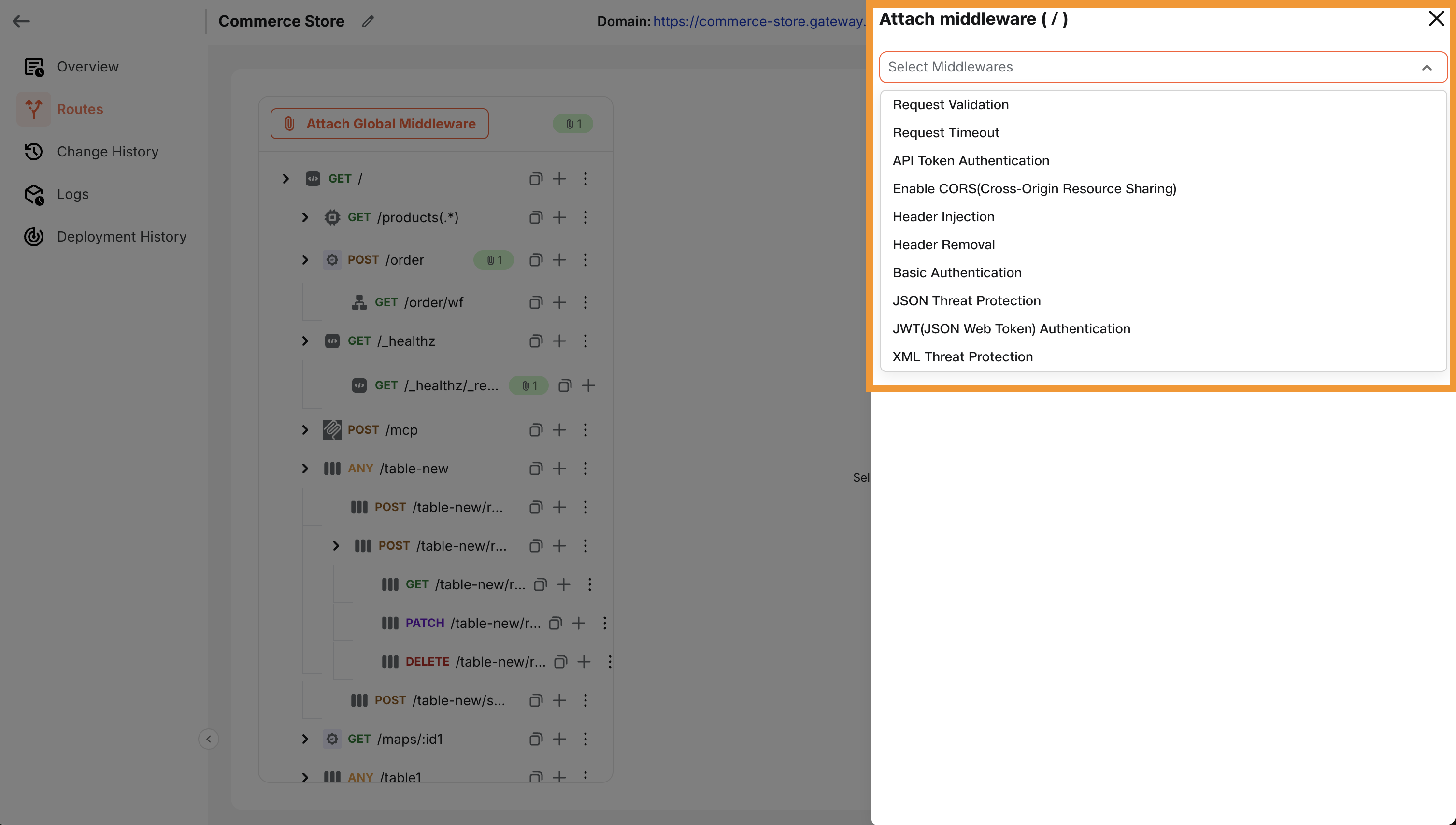
The following middleware types are supported out of the box, each designed to handle specific security and validation use cases:
| Middleware | Description |
|---|---|
| Header Removal | Removes sensitive or unnecessary headers before forwarding the request. |
| Basic Authentication | Authenticates incoming requests using base64-encoded username/password. |
| Request Timeout | Aborts the request if it exceeds a configured duration (e.g., 5s). |
| Header Injection | Injects static or dynamic headers (e.g., trace IDs, client info). |
| JSON Threat Protection | Guards against malicious JSON payloads (e.g., deeply nested structures). |
| XML Threat Protection | Mitigates common XML attacks such as XXE and entity expansion. |
| API Token Authentication | Validates requests using pre-configured API tokens (from header/query/body). |
| CORS | Adds CORS headers dynamically for cross-origin support. |
| JWT Authentication | Validates signed JWTs and extracts claims for use in routing/middleware. |
| Rate Limit | Controls the rate of incoming requests to prevent abuse and ensure fair usage. |
| Pre Request Transform | Transforms the request (headers, body, query params) before forwarding to the upstream service. Learn more → |
| Post Request Transform | Transforms the response (headers, body, status code) before returning it to the client. Learn more → |
| Ip Restriction | Restricts access based on IP addresses. Configure whitelist IPs to allow and blacklist IPs to block. |
 |
|---|
 |
|---|
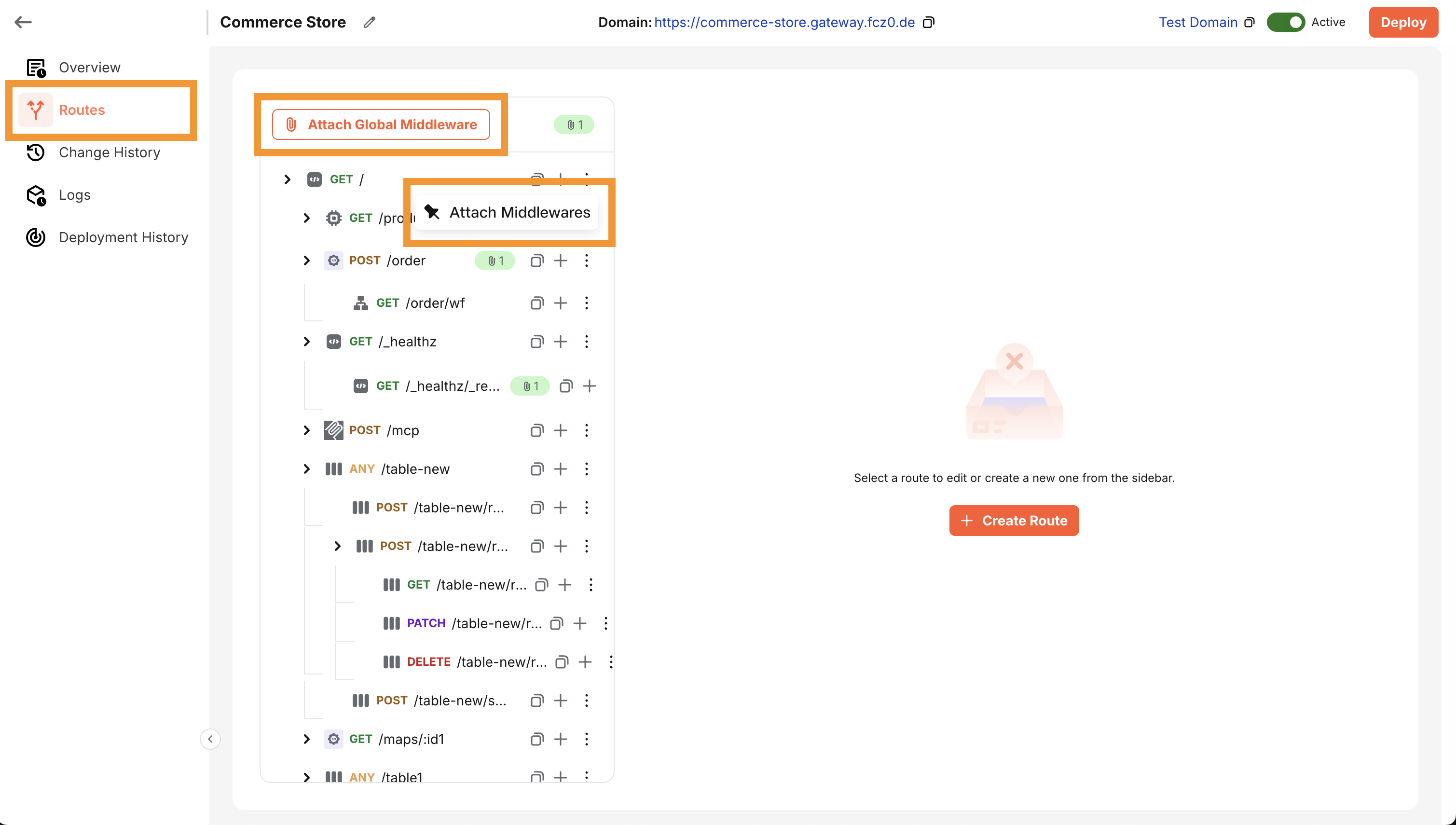
Middleware Scope
-
Global Middleware: Applies to all routes within a gateway. Ideal for shared behaviors like authentication, logging, or threat protection.
-
Path-Level Middleware: Applied to specific routes only, allowing more granular control over security enforcement.
Auth Key Sanitization
When any authentication middleware (e.g., API Token, JWT, Basic Auth) is used:
-
The gateway will automatically strip the authentication token/key from the request before passing it downstream.
-
This applies to tokens present in:
- Headers
- Query Parameters
- Cookies
- Request Body
This ensures that sensitive authentication data does not leak to downstream services.
Query Parameter Handling
- Query parameters are preserved and forwarded downstream by default.
- However, if the request uses API Token Authentication and the token is passed via a query parameter, that token will be removed before forwarding to protect against token leakage.
Request Transform (Pre & Post)
Use Request Transform middleware to adjust traffic before it reaches your upstream (Pre) and before the response returns to the client (Post). Both handlers use the same utility functions where applicable.
Pre Request Transform Example: Tracking & Enrichment
function preRequestHandler() {
  // Add a unique request ID for tracing
  const requestId = 'req-' + Date.now() + '-' + Math.random().toString(36).substr(2, 9);
  setHeader('x-request-id', requestId);

  // Add a timestamp header (example static value for docs)
  setHeader('x-request-timestamp', '2026-01-14T00:00:00.000Z');

  // Remove noisy debug params before forwarding upstream
  removeQueryParam('debug');
  removeQueryParam('verbose');

  // Enrich body with tenant metadata if available
  const tenantId = getHeader('x-tenant-id');
  const body = getJsonBody();

  if (body && tenantId) {
    body.metadata = {
      tenantId,
      requestId,
      processedAt: '2026-01-14T00:00:00.000Z'
    };
    setJsonBody(body);
  }
}
Post Request Transform Example: Normalize & Sanitize Response
function postRequestHandler() {
  // Always return JSON content type
  setHeader('content-type', 'application/json');

  // Read response body
  const body = getJsonBody();

  // If upstream returned an empty/falsey body, set a standard envelope
  if (!body || typeof body !== 'object') {
    setStatusCode(200);
    setJsonBody({ data: null, error: null });
    return;
  }

  // Remove any sensitive internal headers before sending to client
  removeHeader('x-internal-token');
  removeHeader('x-upstream-debug');

  // Add a correlationId and standard envelope
  const correlationId = getHeader('x-request-id') || 'n/a';
  setStatusCode(200);
  setJsonBody({
    data: body,
    error: null,
    meta: { correlationId }
  });
}
Shared Utility Functions
| Category | Function | Description |
|---|---|---|
| Headers | setHeader(key, value) | Add or update a header |
removeHeader(key) | Remove a header | |
getHeader(key) | Read a header value | |
| Query Params (Pre) | setQueryParam(key, value) | Add or update a query param |
removeQueryParam(key) | Remove a query param | |
getQueryParam(key) | Read a query param | |
| Body (JSON) | getJsonBody() | Read body as JSON (throws if not valid JSON) |
setJsonBody(json) | Write JSON body | |
| Method (Pre) | setMethod(method) | Change HTTP method |
| Status (Post) | setStatusCode(statusCode) | Set response status code |
Custom Exceptions (Pre & Post)
throw new InvalidJsonContentTypeError('your message here', 415, { details: {} });
throw new GatewayError('your message here', 500, { details: {} });
Testing Your Script
Use the Sample Event panel to validate both pre and post transforms:
- Configure request context: method, URL, headers, query params, body (JSON).
- Click Test to run the middleware.
- Inspect Output to see applied changes:
- Added/modified headers
- Added/removed query params (Pre)
- Modified body
- Changed method (Pre)
- Updated status code (Post)
Test before deploying to ensure your request/response transformations behave as expected.
Best Practices
- Apply global middleware for consistent security posture across all endpoints (e.g., CORS, threat protection).
- Use path-level overrides for route-specific logic like custom timeouts or different auth types.
- Enable JWT or API Token Authentication for secure multi-tenant routing.
- Sanitize sensitive data (e.g., auth tokens, API keys) using Header Removal or built-in stripping mechanisms.
With these flexible authentication and security capabilities, Fynd Boltic Gateway empowers you to enforce fine-grained control and enterprise-grade protection—while keeping your downstream services clean, fast, and secure.