Building a Serverless API with Boltic Tables
Learn how to create, develop, and deploy a serverless function that connects to Boltic Tables using its native PostgreSQL interface. By the end of this tutorial, you'll have a fully functional REST API backed by Boltic Tables.
Prerequisites
Before you begin, ensure you have:
- Node.js 18+ installed on your machine
- Boltic CLI installed (
npm install -g @boltic/cli) - A Boltic account with access to Tables
- Basic familiarity with JavaScript/Node.js
What You'll Build
A serverless REST API that:
- Connects to Boltic Tables via PostgreSQL
- Performs CRUD operations on a
taskstable - Handles errors gracefully
- Deploys to Boltic's serverless infrastructure
Step 1: Install the Boltic CLI
If you haven't already installed the Boltic CLI, run:
npm install -g @boltic/cli
Verify the installation:
boltic --version
You should see output similar to:
boltic-cli/1.0.42
Step 2: Authenticate with Boltic
Log in to your Boltic account using the CLI:
boltic login
This opens your browser for secure authentication. Once complete, you'll see:
✓ Successfully logged in to Boltic
For CI/CD environments, use a Personal Access Token instead.
Step 3: Set Up Your Boltic Table
Before creating the serverless function, set up your table in Boltic Tables.
3.1 Create a New Table
- Navigate to Boltic Console > Tables
- Click Create Table
- Name it
tasks
3.2 Define the Schema
Add the following columns:
| Column Name | Type | Constraints |
|---|---|---|
id | SERIAL | Primary Key |
title | VARCHAR(255) | NOT NULL |
description | TEXT | - |
status | VARCHAR(50) | DEFAULT 'pending' |
created_at | TIMESTAMP | DEFAULT NOW() |
updated_at | TIMESTAMP | DEFAULT NOW() |
3.3 Get Your PostgreSQL Connection String
-
Go to Databases > Settings
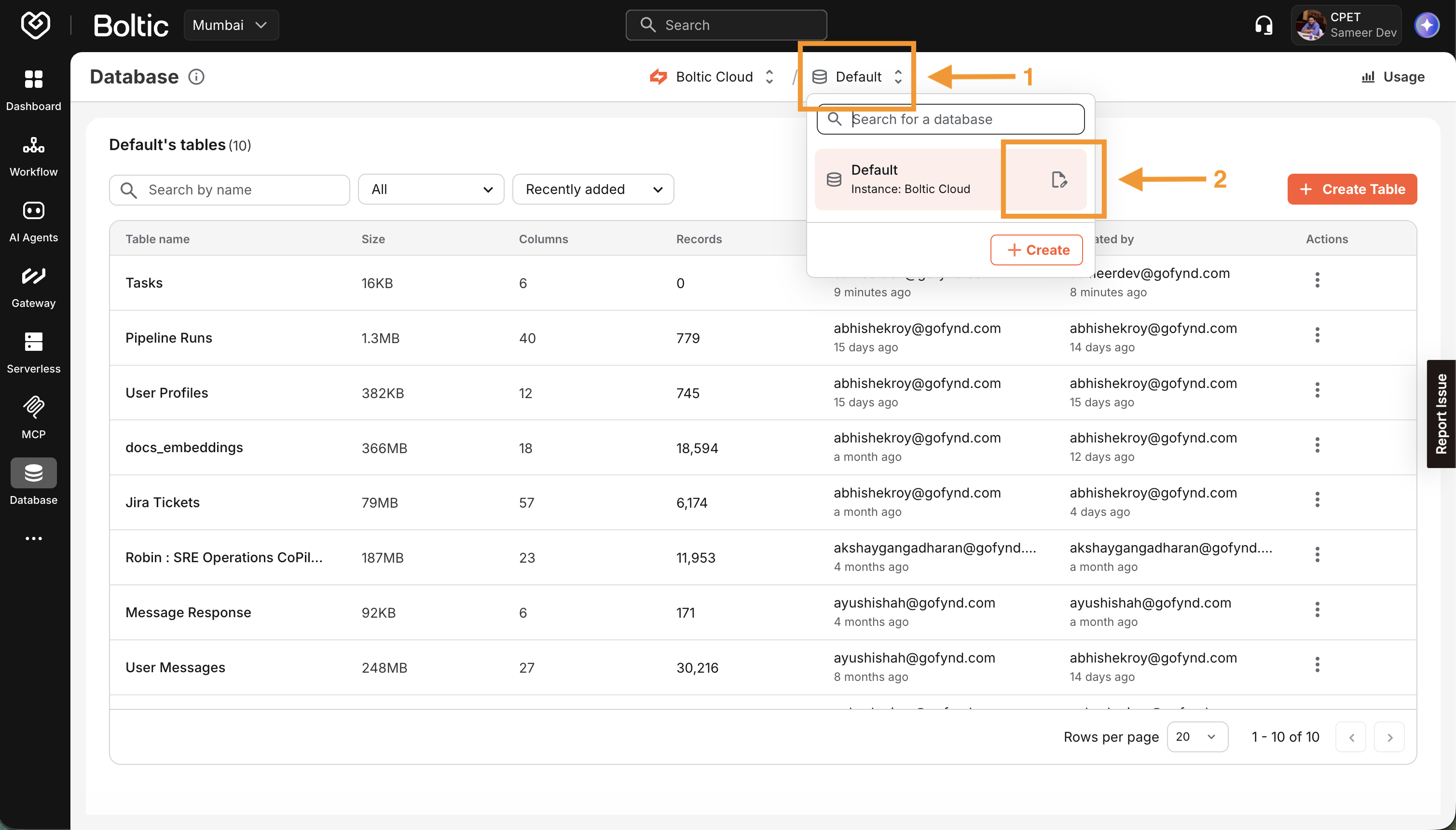
-
Copy the PostgreSQL connection string
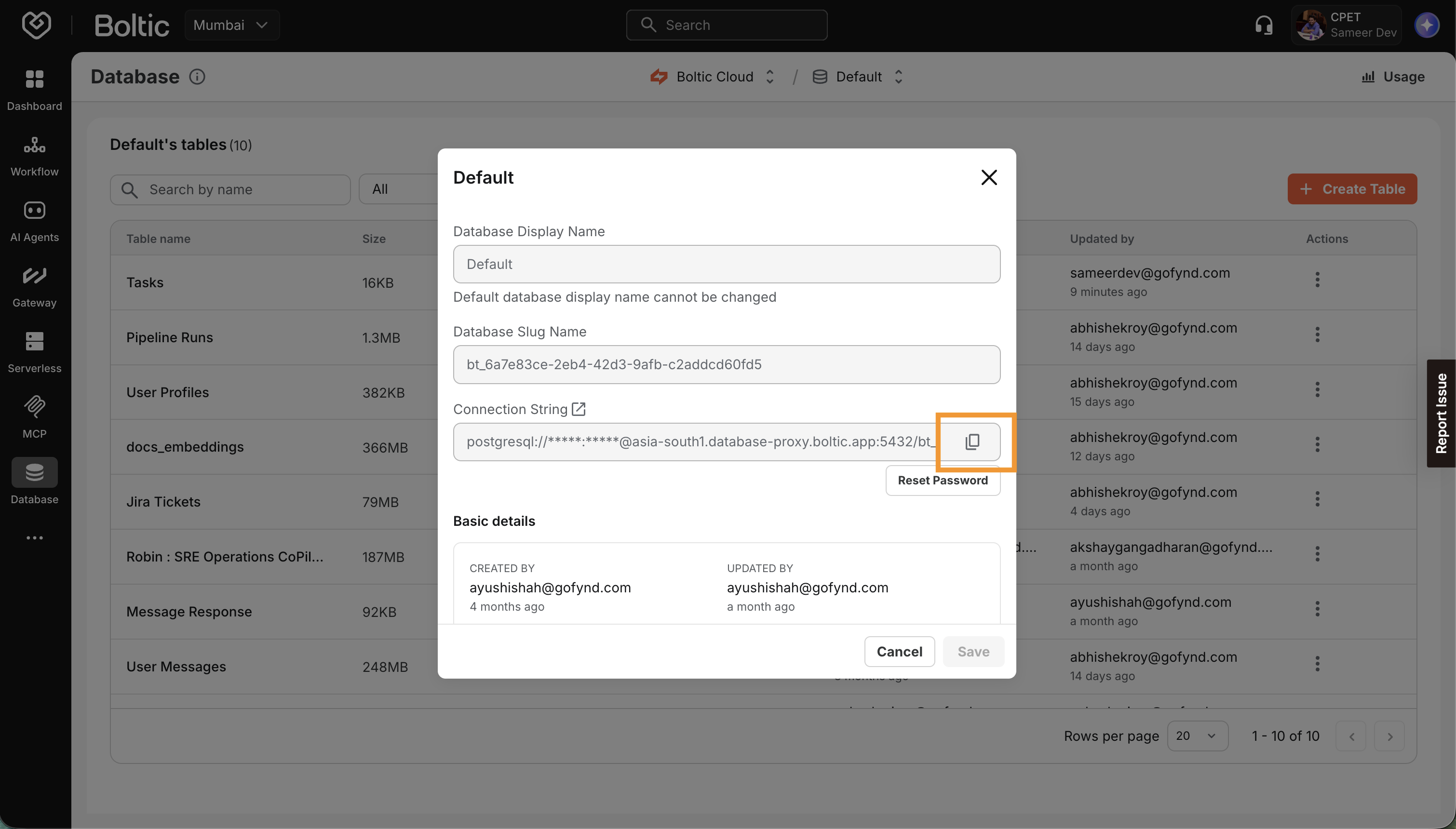
Your connection string will look like:
postgresql://user:[email protected]:5432/your_database
Keep this connection string secure. You'll add it as an environment variable in your serverless configuration.
Step 4: Create the Serverless Function
Use the Boltic CLI to scaffold a new serverless project:
boltic serverless create --type git --name tasks-api --language nodejs
You'll see:
📁 Git-based serverless project created successfully!

   Name: tasks-api
   Type: git
   Language: nodejs/20
   Location: /Users/sameerdev/projects/fynd/codebase/Boltic/tasks-api
   Serverless ID: ea493998-ce7b-4066-8022-c55bb05df55e
Navigate to your project:
cd tasks-api
Step 5: Project Structure
Your project structure looks like this:
tasks-api/
└── boltic.yaml      # Serverless configuration
Understanding boltic.yaml
app: "tasks-api"
region: "asia-south1"
handler: "handler.handler"
language: "nodejs"

serverlessConfig:
  Name: "tasks-api"
  Description: "REST API for task management with Boltic Tables"
  Runtime: "code"
  Env:
    DATABASE_URL: "${DATABASE_URL}"
  Scaling:
    AutoStop: true
    Min: 0
    Max: 10
    MaxIdleTime: 300
  Resources:
    CPU: 0.25
    MemoryMB: 256
    MemoryMaxMB: 512
  Timeout: 30

build:
  builtin: dockerfile
  ignorefile: .gitignore
Step 6: Install Dependencies
Initialize your Node.js project and add the PostgreSQL client library:
npm init -y
npm install pg
Your package.json should include:
{
  "name": "tasks-api",
  "version": "1.0.0",
  "type": "module",
  "dependencies": {
    "pg": "^8.11.3"
  }
}
Step 7: Write the Handler Code
Replace the contents of handler.js with the following code:
import pg from 'pg';

const { Pool } = pg;

// Initialize PostgreSQL connection pool
const pool = new Pool({
  connectionString: process.env.DATABASE_URL,
  ssl: {
    rejectUnauthorized: false
  },
  max: 10,
  idleTimeoutMillis: 30000,
  connectionTimeoutMillis: 10000,
});

/**
 * Main handler function for the serverless API
 * @param {Object} req - The incoming request object
 * @param {Object} res - The response object
 */
export const handler = async (req, res) => {
  const { method, path, body, query } = req;

  try {
    // Route handling
    if (path === '/health' && method === 'GET') {
      return await healthCheck(res);
    }

    if (path === '/tasks') {
      switch (method) {
        case 'GET':
          return await getAllTasks(res, query);
        case 'POST':
          return await createTask(res, body);
        default:
          return sendResponse(res, 405, { error: 'Method not allowed' });
      }
    }

    // Handle /tasks/:id routes
    const taskMatch = path.match(/^\/tasks\/(\d+)$/);
    if (taskMatch) {
      const taskId = parseInt(taskMatch[1], 10);
      switch (method) {
        case 'GET':
          return await getTaskById(res, taskId);
        case 'PUT':
          return await updateTask(res, taskId, body);
        case 'DELETE':
          return await deleteTask(res, taskId);
        default:
          return sendResponse(res, 405, { error: 'Method not allowed' });
      }
    }

    return sendResponse(res, 404, { error: 'Not found' });

  } catch (error) {
    console.error('Handler error:', error);
    return sendResponse(res, 500, { error: 'Internal server error', message: error.message });
  }
};

// ============================================================================
// Health Check
// ============================================================================

async function healthCheck(res) {
  try {
    const client = await pool.connect();
    await client.query('SELECT 1');
    client.release();
    return sendResponse(res, 200, { status: 'healthy', database: 'connected' });
  } catch (error) {
    return sendResponse(res, 503, { status: 'unhealthy', database: 'disconnected', error: error.message });
  }
}

// ============================================================================
// Task CRUD Operations
// ============================================================================

/**
 * Get all tasks with optional filtering and pagination
 */
async function getAllTasks(res, query = {}) {
  const { status, limit = 50, offset = 0 } = query;

  let sql = 'SELECT * FROM tasks';
  const params = [];

  if (status) {
    sql += ' WHERE status = $1';
    params.push(status);
  }

  sql += ` ORDER BY created_at DESC LIMIT $${params.length + 1} OFFSET $${params.length + 2}`;
  params.push(parseInt(limit, 10), parseInt(offset, 10));

  const result = await pool.query(sql, params);

  // Get total count for pagination
  let countSql = 'SELECT COUNT(*) FROM tasks';
  const countParams = [];
  if (status) {
    countSql += ' WHERE status = $1';
    countParams.push(status);
  }
  const countResult = await pool.query(countSql, countParams);

  return sendResponse(res, 200, {
    tasks: result.rows,
    pagination: {
      total: parseInt(countResult.rows[0].count, 10),
      limit: parseInt(limit, 10),
      offset: parseInt(offset, 10)
    }
  });
}

/**
 * Get a single task by ID
 */
async function getTaskById(res, id) {
  const result = await pool.query('SELECT * FROM tasks WHERE id = $1', [id]);

  if (result.rows.length === 0) {
    return sendResponse(res, 404, { error: 'Task not found' });
  }

  return sendResponse(res, 200, { task: result.rows[0] });
}

/**
 * Create a new task
 */
async function createTask(res, data) {
  if (!data || !data.title) {
    return sendResponse(res, 400, { error: 'Title is required' });
  }

  const { title, description = null, status = 'pending' } = data;

  const result = await pool.query(
    `INSERT INTO tasks (title, description, status, created_at, updated_at)
     VALUES ($1, $2, $3, NOW(), NOW())
     RETURNING *`,
    [title, description, status]
  );

  return sendResponse(res, 201, { task: result.rows[0], message: 'Task created successfully' });
}

/**
 * Update an existing task
 */
async function updateTask(res, id, data) {
  if (!data) {
    return sendResponse(res, 400, { error: 'Update data is required' });
  }

  // Check if task exists
  const existing = await pool.query('SELECT * FROM tasks WHERE id = $1', [id]);
  if (existing.rows.length === 0) {
    return sendResponse(res, 404, { error: 'Task not found' });
  }

  const { title, description, status } = data;
  const updates = [];
  const params = [];
  let paramIndex = 1;

  if (title !== undefined) {
    updates.push(`title = $${paramIndex++}`);
    params.push(title);
  }
  if (description !== undefined) {
    updates.push(`description = $${paramIndex++}`);
    params.push(description);
  }
  if (status !== undefined) {
    updates.push(`status = $${paramIndex++}`);
    params.push(status);
  }

  if (updates.length === 0) {
    return sendResponse(res, 400, { error: 'No valid fields to update' });
  }

  updates.push(`updated_at = NOW()`);
  params.push(id);

  const result = await pool.query(
    `UPDATE tasks SET ${updates.join(', ')} WHERE id = $${paramIndex} RETURNING *`,
    params
  );

  return sendResponse(res, 200, { task: result.rows[0], message: 'Task updated successfully' });
}

/**
 * Delete a task
 */
async function deleteTask(res, id) {
  const result = await pool.query('DELETE FROM tasks WHERE id = $1 RETURNING *', [id]);

  if (result.rows.length === 0) {
    return sendResponse(res, 404, { error: 'Task not found' });
  }

  return sendResponse(res, 200, { message: 'Task deleted successfully', task: result.rows[0] });
}

// ============================================================================
// Helper Functions
// ============================================================================

/**
 * Send a JSON response
 */
function sendResponse(res, statusCode, data) {
  res.statusCode = statusCode;
  res.setHeader('Content-Type', 'application/json');
  res.end(JSON.stringify(data));
}
Step 8: Configure Environment Variables
Update your boltic.yaml to include the database connection:
app: "tasks-api"
region: "asia-south1"
handler: "handler.handler"
language: "nodejs"

serverlessConfig:
  Name: "tasks-api"
  Description: "REST API for task management with Boltic Tables"
  Runtime: "git"
  Env:
    DATABASE_URL: "postgresql://user:[email protected]:5432/your_database"
    NODE_ENV: "production"
  Scaling:
    AutoStop: true
    Min: 0
    Max: 10
    MaxIdleTime: 300
  Resources:
    CPU: 0.25
    MemoryMB: 256
    MemoryMaxMB: 512
  Timeout: 30

build:
  builtin: dockerfile
  ignorefile: .gitignore
Step 9: Deploy to Boltic
For git based serverless, just commit and push the code to the serverless repository. For non-git serverless pleease do the following
boltic serverless publish
You'll see the deployment progress:
✓ Validating configuration...
✓ Packaging function...
✓ Uploading to Boltic...
✓ Building container...
✓ Deploying...

✓ Deployment successful!
  → Function URL: https://tasks-api-abc123.boltic.app
  → Status: Running
Step 10: Monitor Your Function
Check Deployment Status
boltic serverless status --name tasks-api
Output:
┌─────────────────────────────────────────────────────────┐
│ Serverless: tasks-api                                   │
├─────────────────────────────────────────────────────────┤
│ Status:     Running                                     │
│ URL:        https://tasks-api-abc123.boltic.app        │
│ Region:     asia-south1                                 │
│ Runtime:    nodejs20                                    │
│ Replicas:   1/10                                        │
│ CPU:        0.25                                        │
│ Memory:     256 MB                                      │
└─────────────────────────────────────────────────────────┘
Watch Status in Real-Time
boltic serverless status --name tasks-api --watch
View Runtime Logs
boltic serverless logs --name tasks-api --watch
View Build History
boltic serverless builds --name tasks-api
View Specific Build Logs
boltic serverless build logs --name tasks-api --build <BUILD_ID>
Step 11: Test Your Endpoint
Test your deployed function:
# Health check
curl https://tasks-api-abc123.boltic.app/health

# Create a task
curl -X POST https://tasks-api-abc123.boltic.app/tasks \
  -H "Content-Type: application/json" \
  -d '{"title": "Production task", "description": "This is live!"}'

# Get all tasks
curl https://tasks-api-abc123.boltic.app/tasks
API Reference
Your deployed serverless function exposes the following endpoints:
| Method | Endpoint | Description |
|---|---|---|
GET | /health | Health check with database connectivity status |
GET | /tasks | List all tasks (supports ?status=, ?limit=, ?offset=) |
GET | /tasks/:id | Get a specific task by ID |
POST | /tasks | Create a new task |
PUT | /tasks/:id | Update an existing task |
DELETE | /tasks/:id | Delete a task |
Request/Response Examples
Create Task
Request:
POST /tasks
{
  "title": "Complete tutorial",
  "description": "Finish the Boltic serverless tutorial",
  "status": "in_progress"
}
Response:
{
  "task": {
    "id": 1,
    "title": "Complete tutorial",
    "description": "Finish the Boltic serverless tutorial",
    "status": "in_progress",
    "created_at": "2024-01-15T10:30:00.000Z",
    "updated_at": "2024-01-15T10:30:00.000Z"
  },
  "message": "Task created successfully"
}
List Tasks with Pagination
Request:
GET /tasks?status=pending&limit=10&offset=0
Response:
{
  "tasks": [
    {
      "id": 1,
      "title": "Task 1",
      "description": "Description",
      "status": "pending",
      "created_at": "2024-01-15T10:30:00.000Z",
      "updated_at": "2024-01-15T10:30:00.000Z"
    }
  ],
  "pagination": {
    "total": 25,
    "limit": 10,
    "offset": 0
  }
}
Troubleshooting
Database Connection Failed
Error: Connection refused
Solution:
- Verify your
DATABASE_URLis correct - Check that Boltic Tables allows connections from serverless functions
- Ensure SSL is properly configured
Function Timeout
Error: Function execution timed out
Solution:
- Increase
Timeoutinboltic.yaml - Optimize database queries
- Add connection pooling (already included in example)
Build Failures
# Check build logs
boltic serverless build logs --name tasks-api --build <BUILD_ID>
Common causes:
- Missing dependencies in
package.json - Syntax errors in handler code
- Invalid
boltic.yamlconfiguration
Next Steps
Congratulations! You've successfully deployed a serverless API connected to Boltic Tables. Here are some ways to extend your application:
- Add Authentication: Implement JWT or API key authentication
- Add Validation: Use a validation library like
joiorzod - Add Caching: Implement Redis caching for frequently accessed data
- Add Monitoring: Set up alerts and dashboards in Boltic Console
- Scale Configuration: Adjust autoscaling parameters based on traffic
- Set up CI/CD: Automate deployments with GitHub Actions
CLI Commands Cheatsheet
# Authentication
boltic login                              # Browser-based login
boltic logout                             # Clear credentials

# Create & Develop
boltic serverless create                  # Interactive creation
boltic serverless test                    # Local testing
boltic serverless test --port 3000        # Custom port

# Deploy & Manage
boltic serverless publish                 # Deploy function
boltic serverless list                    # List all functions
boltic serverless pull --path ./backup    # Download function

# Monitor
boltic serverless status --name <name>    # Check status
boltic serverless status --name <name> --watch  # Watch status
boltic serverless logs --name <name> --follow   # Stream logs
boltic serverless builds --name <name>    # List builds