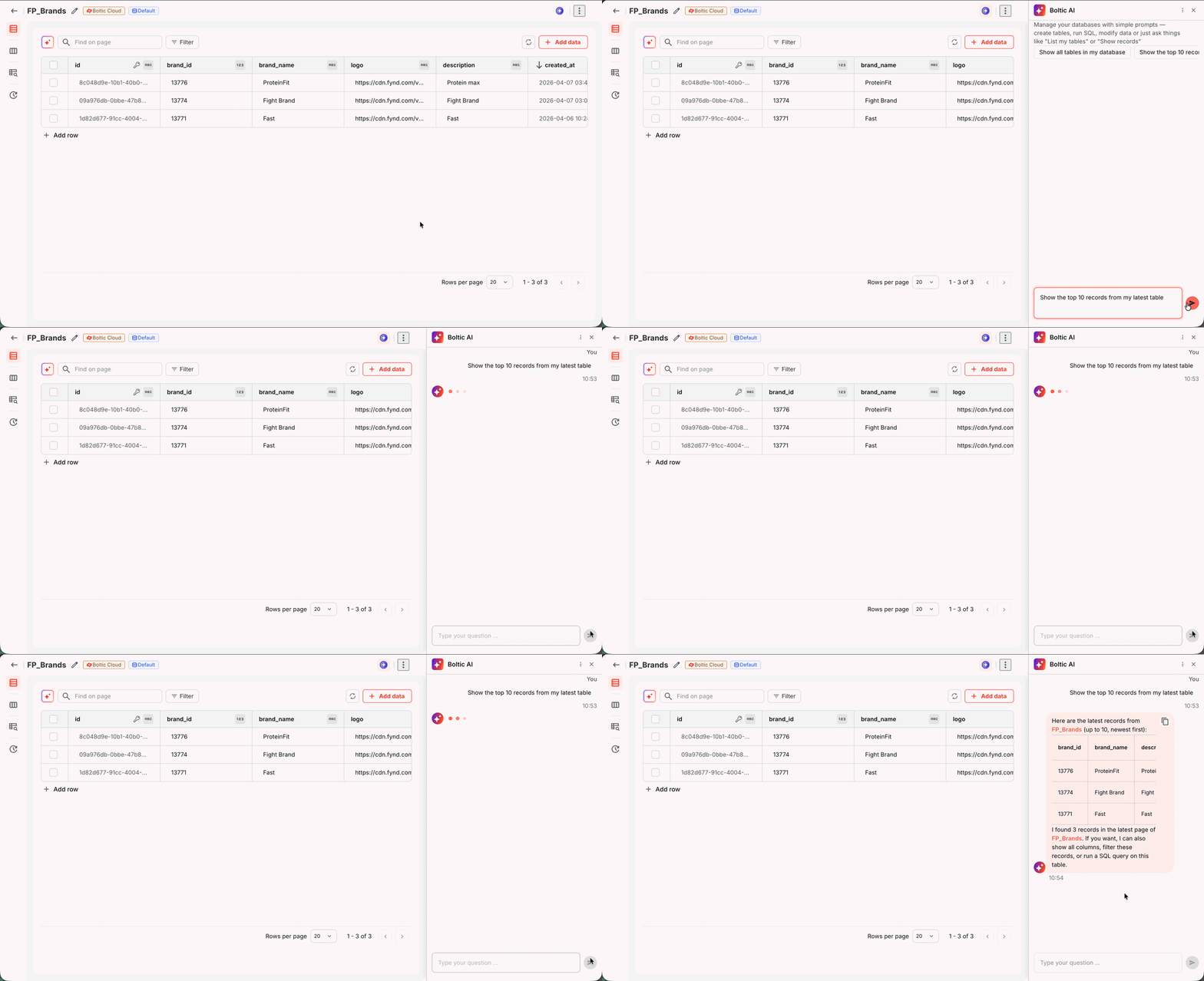
Boltic Table AI
Boltic Table AI lets you interact with your data using natural language, without SQL or manual effort. Ask questions, explore tables, and get insights instantly.
It is a conversational assistant that helps you create, query, and manage tables using plain English, eliminating the need for manual actions such as table creation, updates, and data modifications. It works seamlessly with your selected database and tables, adapting to your context or guiding you when needed.
Powered by OpenAI GPT-5.4 and built on LangGraph ReAct, it translates your intent into accurate database operations in real time.
What You Can Do
With Boltic Table AI, you can:
- Query data using natural language
- Analyze and summarize table data
- Create new tables and records
- Update or modify existing data
- Manage table structure and content
- Refine results through conversation
- Create new databases
How It Works
Table AI understands your request and performs actions based on your current context.
When a table is already selected
- All actions are automatically performed on the selected table
- No need to mention the table again
When only a database is selected
- Table AI uses the selected database
- It will ask you to specify the table before proceeding
When no context is provided
- Table AI guides you step by step
- It may ask for database or table details to continue
Chat Sessions
Boltic Table AI supports multiple chat sessions, allowing you to manage and organize your work more effectively.
You can:
- Start a new chat session
- Delete an existing session
- Continue previous conversations
Each session maintains:
- Your query history
- Context for follow-up actions
Supported Operations
| Area | Operations |
|---|---|
| Databases | List, Create, Get, Update, Delete |
| Tables | List, Get, Create, Update, Delete |
| Records | List, Get, Create, Update, Delete |
| Fields | List, Get, Create, Update, Delete |
| Indexes | Get Index Types, List, Create, Delete |
How to Use
- Open Boltic Table AI from your Boltic dashboard.
- Type your request in plain English, for example: "Create a new table for customer orders" or "List all records where status is pending".
- The Intent Dispatcher routes your message to the appropriate agent.
- Boltic Table AI executes the operation and returns a real-time streaming response.
- You can continue the conversation - the agent retains full context throughout your session.
Capabilities
- Natural language operations - Describe the operation in plain English; the agent determines how to execute it.
- Streaming responses - Responses are streamed in real time as the agent processes your request.
- Context-aware conversations - The agent maintains session-based chat history, so follow-up requests are understood in context.
- Automatic routing - The Intent Dispatcher directs each request to the correct agent without manual input.